
Appendices
A: Expenditure Categories
The following are the Expenditure Categories used for Budgeting Awards.
Benefits
Debt Service
Equipment
Financing Costs
Occupancy & Maintenance Costs
Other Operating Costs
Other Personnel Costs
Participants
Professional Services
Salaries and Wages
Student Aid
Subcontracts
Supplies
Travel
To see the Object Codes that makeup these Expenditure Types, refer to the OBI – Segment Lookup Quick Reference Guide. In OBI, use Segment Lookup and prompt by Expenditure Type.
B: Planning Unit Number
The following are the Planning Unit Numbers that are the 2nd and 3rd digit of the award number.
| Planning Unit Numbers | Athens Colleges & Schools |
|---|---|
| 10 | Arts and Sciences |
| 11 | Business |
| 12 | Communication |
| 13 | Education |
| 14 | Engineering |
| 15 | Fine Arts |
| 16 | Health Sciences |
| 17 | Honors Tutorial College |
| 18 | Office of Global Affairs & International Studies |
| 19 | University College |
| 20 | Voinovich |
| 25 | College of Medicine |
| 30 | Exec Dean Regional Campuses |
| 31 | Eastern |
| 32 | Chillicothe |
| 33 | Southern |
| 34 | Lancaster |
| 35 | Pickerington |
| 36 | Zanesville |
| 37 | Proctorville |
| 38 | Cambridge |
| 50 | Provost |
| 51 | Instructional Innovation |
| 52 | Library |
| 53 | VP of Research |
| 54 | Enrollment Management |
| 55 | Academic Support Units |
| 56 | Information Technology |
| 60 | President |
| 61 | Legal Affairs |
| 62 | Government Relations |
| 63 | UCM |
| 66 | Athletics |
| 70 | VP of Advancement |
| 75 | VP Student Affairs |
| 76 | Housing |
| 77 | Culinary Services |
| 79 | Student Organizations |
| 80 | VP of Finance & Administration |
| 81 | VPFA - Auxiliaries |
| 82 | VPFA - Facilities |
| 83 | VPFA - Finance |
| 84 | VPFA - HR |
| 85 | VPFA - Information Technology |
| 95 | Central Accounting |
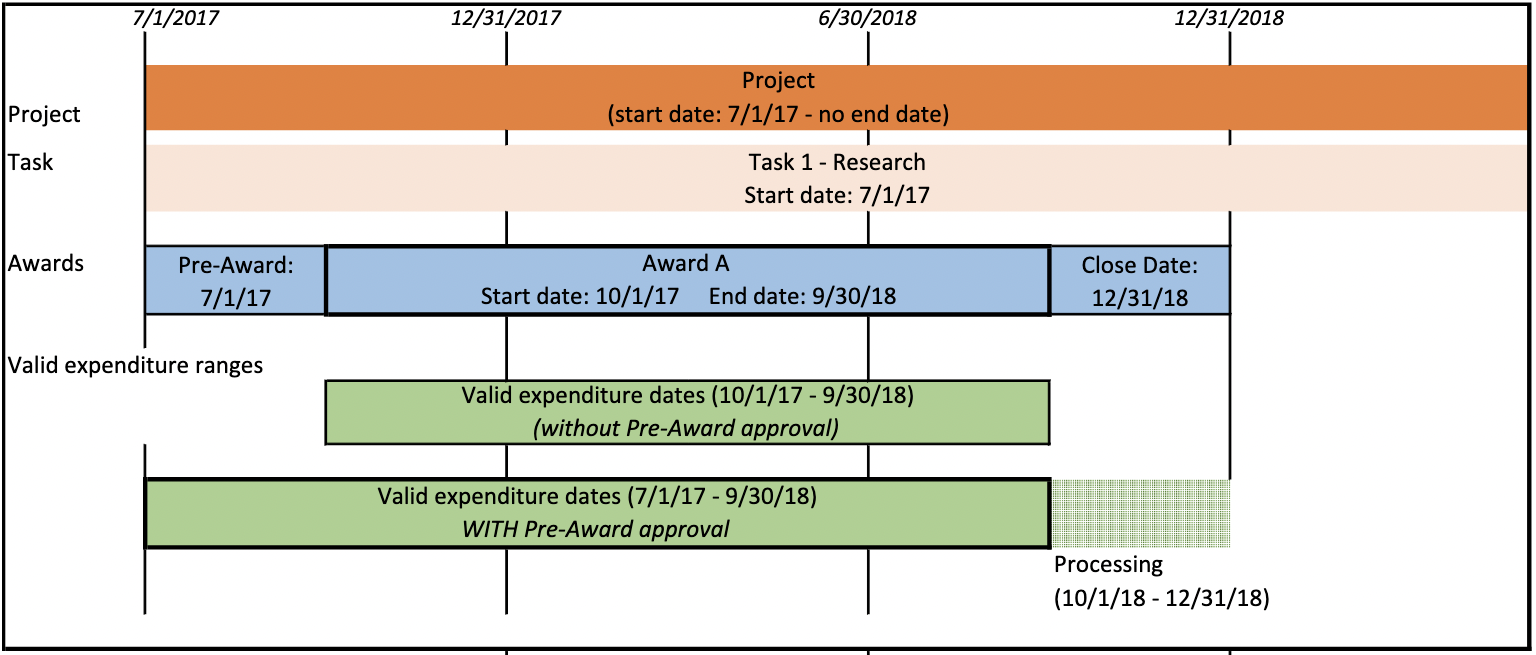
C: Dates Explained
| Field Name | Required | Controls, Expenditure, Transaction, Processing | Description |
|---|---|---|---|
| Project Start Date | X | X | The start date of the project, used in conjunction with Project End date to validate the Expenditure Item date of a given expenditure transaction. |
| Project End Date | N/A | X | The end date of the project, used in conjunction with Project Start to validate the Expenditure Item date of a given expenditure transaction. |
| Task Start Date | X | X | The start date of the task, used in conjunction with Task End date to validate the Expenditure Item date of a given expenditure transaction. Defaults to the project start date but can be modified if needed. Note: The task start/end date range must fall within the project start/end date range. |
| Task End Date | N/A | X | The end date of the task, used in conjunction with Task Start date to validate the Expenditure Item date of a given expenditure transaction. Defaults to the project end date but can be modified if needed. Note: The task start/end date range must fall within the project start/end date range. |
| Award Status | X | X | Indicates the status of the award. Options include On Hold, Active, At-Risk and Closed. Controls transaction processing. |
| Award Start Date | X | X | The start date of the award, used in conjunction with the Award End date to validate the Expenditure Item date of a given expenditure transaction. |
| Award End Date | X | X | The end date of the award, used in conjunction with the Award End date to validate the Expenditure Item date of a given expenditure transaction. |
| Award Close Date | x | X | Must be on or after the Award End Date. Expenditure transactions must be entered on or prior to this date. |
| Installment Start Date | X | N/A | The start date of the award installment, used in conjunction with the Installment End date to validate the Revenue Event Date. Note: The installment start/end date range must fall within the award start/end date range. |
| Installment End Date | X | N/A | The end date of the award installment, used in conjunction with the Installment Start date to validate the Revenue Event Date. Note: The installment start/end date range must fall within the award start/end date range. |
| Installment Close Date | X | N/A | Must be on or after the Installment End Date. Event transactions must be dated on or prior to this date. |
| Funding Date | X | N/A | This date is for reference only, this defaults to current day to provide a date stamp to the funding transaction. |
| Event Date | X | N/A | Date for JE (Event)-usually today's date. If you use a future date, this is the date the JE (Event) will occur. If you use a prior year date during the month of July, (when the Grants Module is open for June & July & Grants Accounting is backdating jobs) the JE (Event) will post to June. If you use a prior month/year date any other month, the JE (Event) will post to the current month. |
| Budget Period | X | N/A | The accounting period to which a PTA's budget is posted. A PTA must be budgeted in order to begin processing transactions against it. |
| Expenditure Item Date | X | X | The date the expenditure transaction was incurred. This date is validated against the PTA start and end dates. |
| Expenditure PA Date (PA stands for Project Accounting), Expenditure GL Date | X | X | The post date of the transaction to the PTA that is used for financial reporting purposes. |
Dates on the Project-Task-Award control the expenditure item dates of transactions that can post to the PTA
- Project
- Project start date is required
- End date is not required
- Task
- Task start date is required
- End date is not required. End dates are used on Tasks for specific time periods
- Award
- Award start and end dates are required
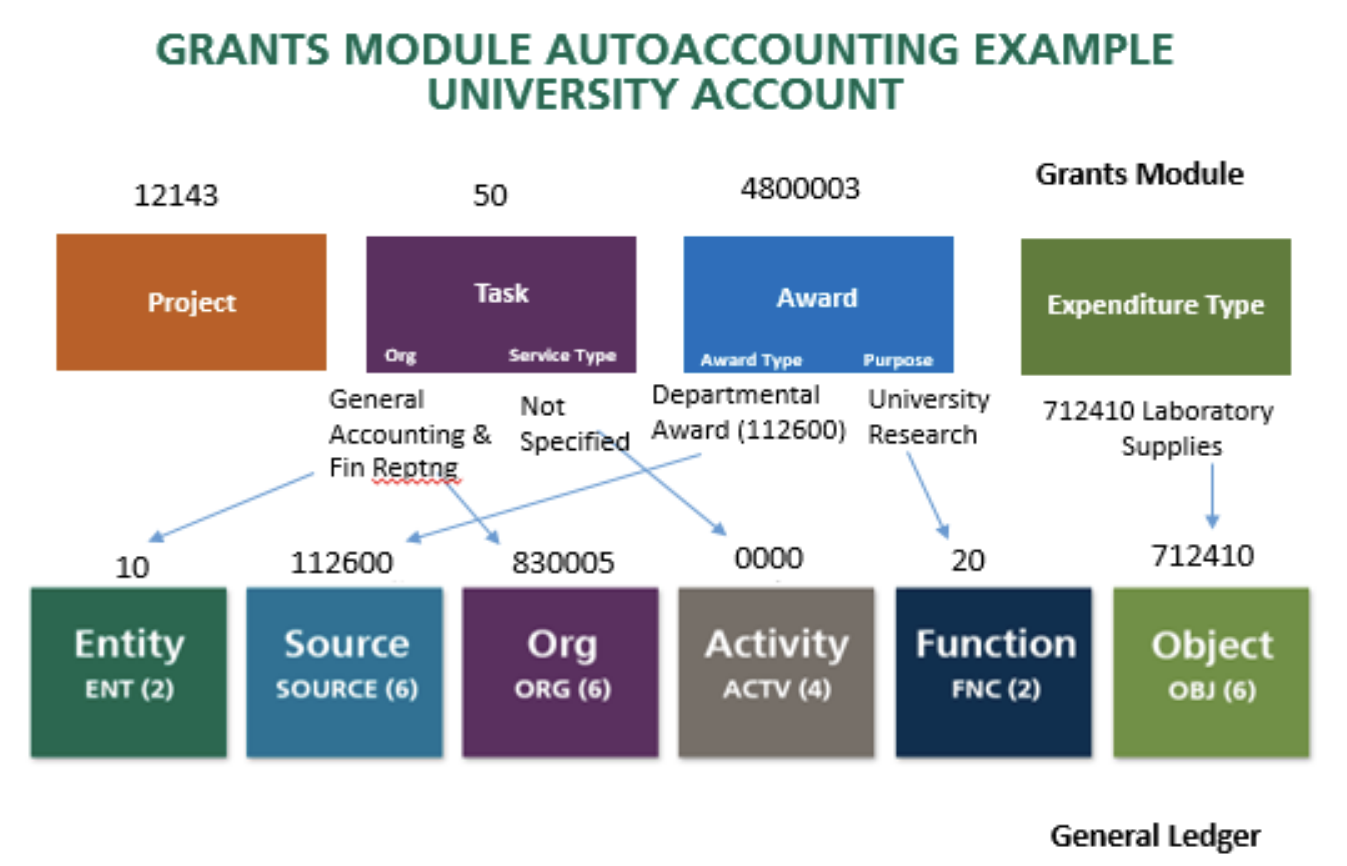
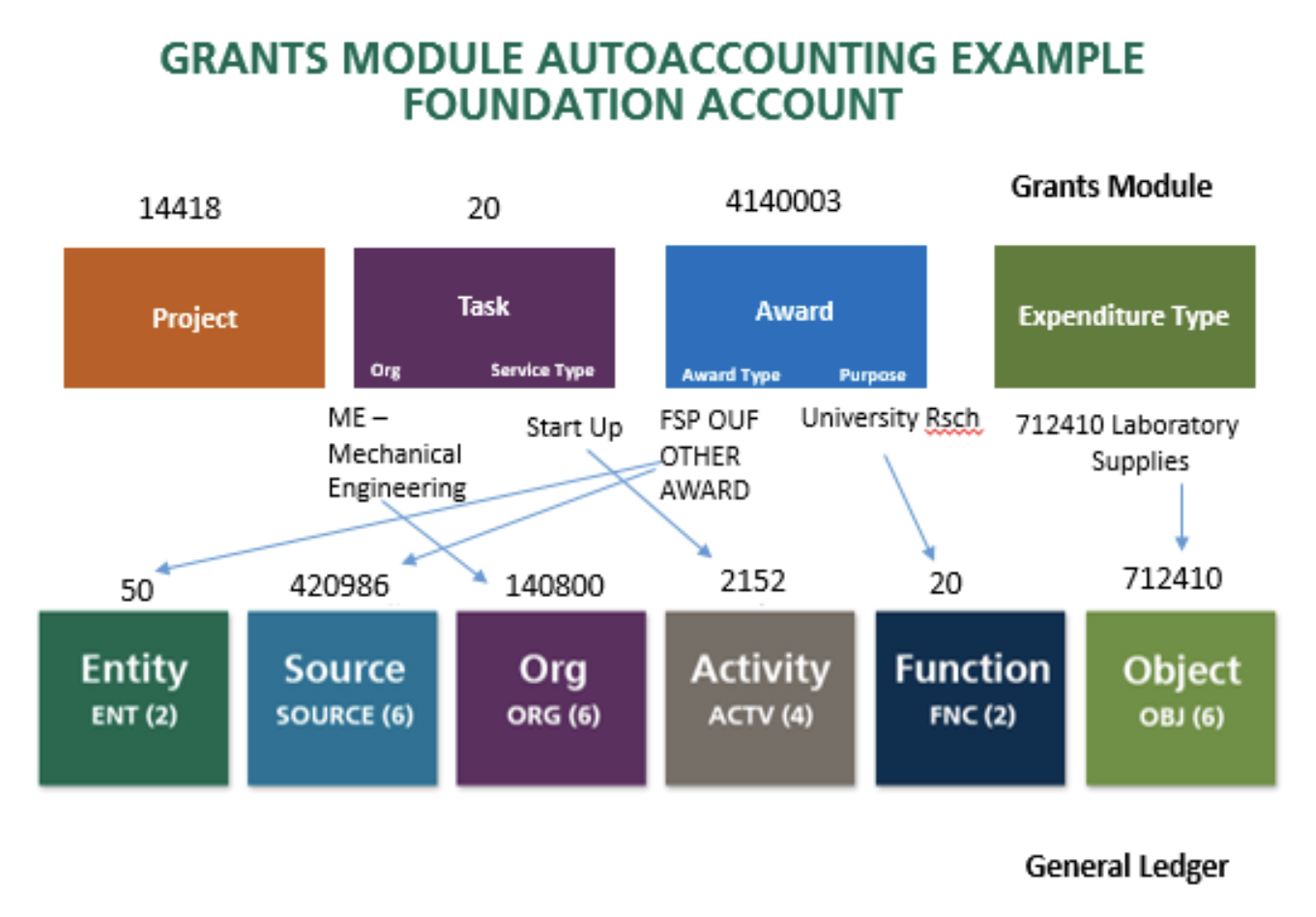
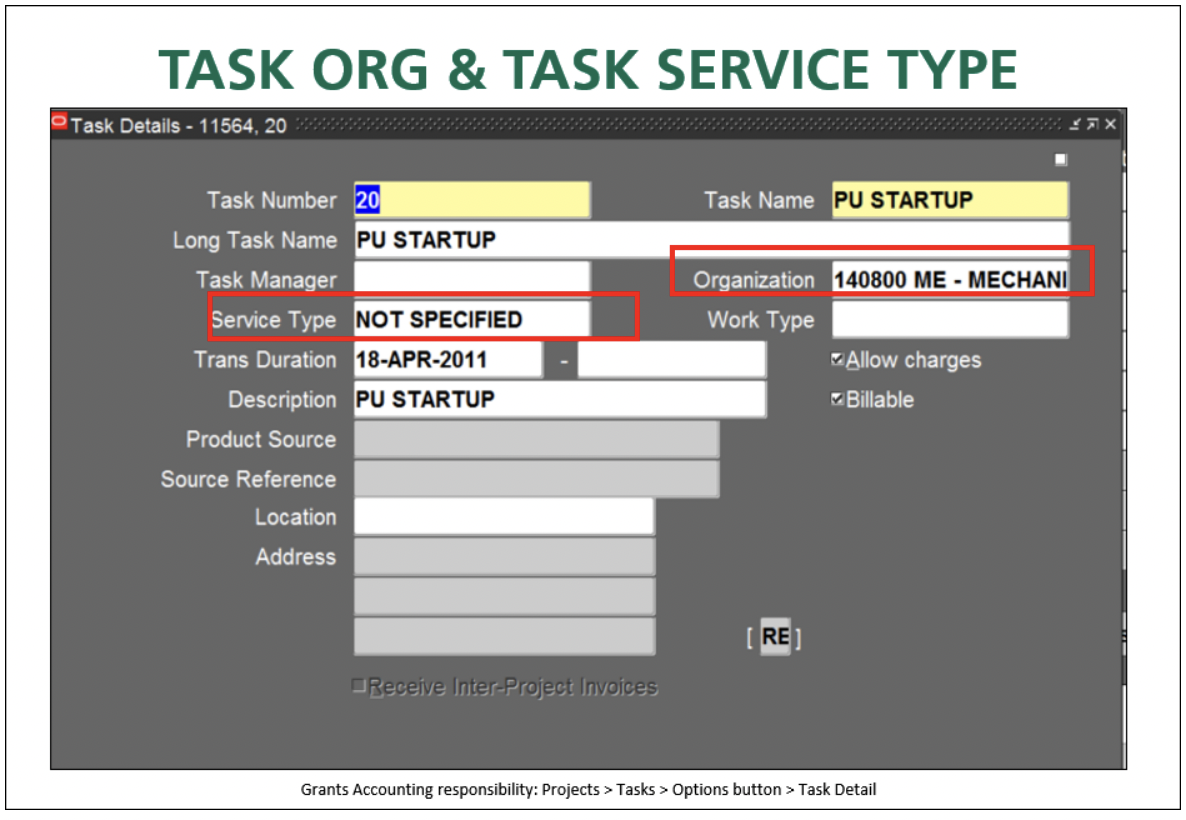
D: Autoaccounting Example
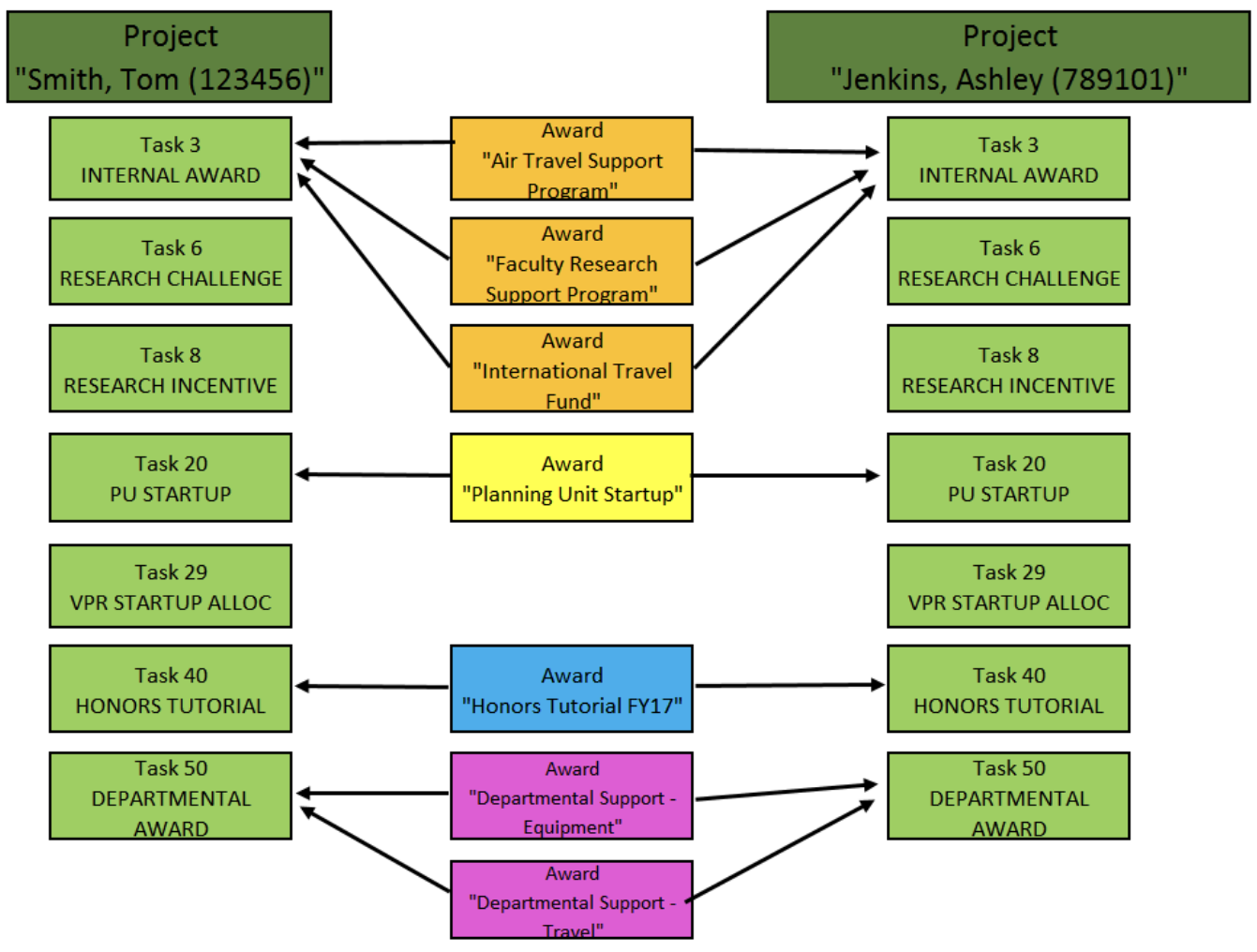
E: Multifunding Concept
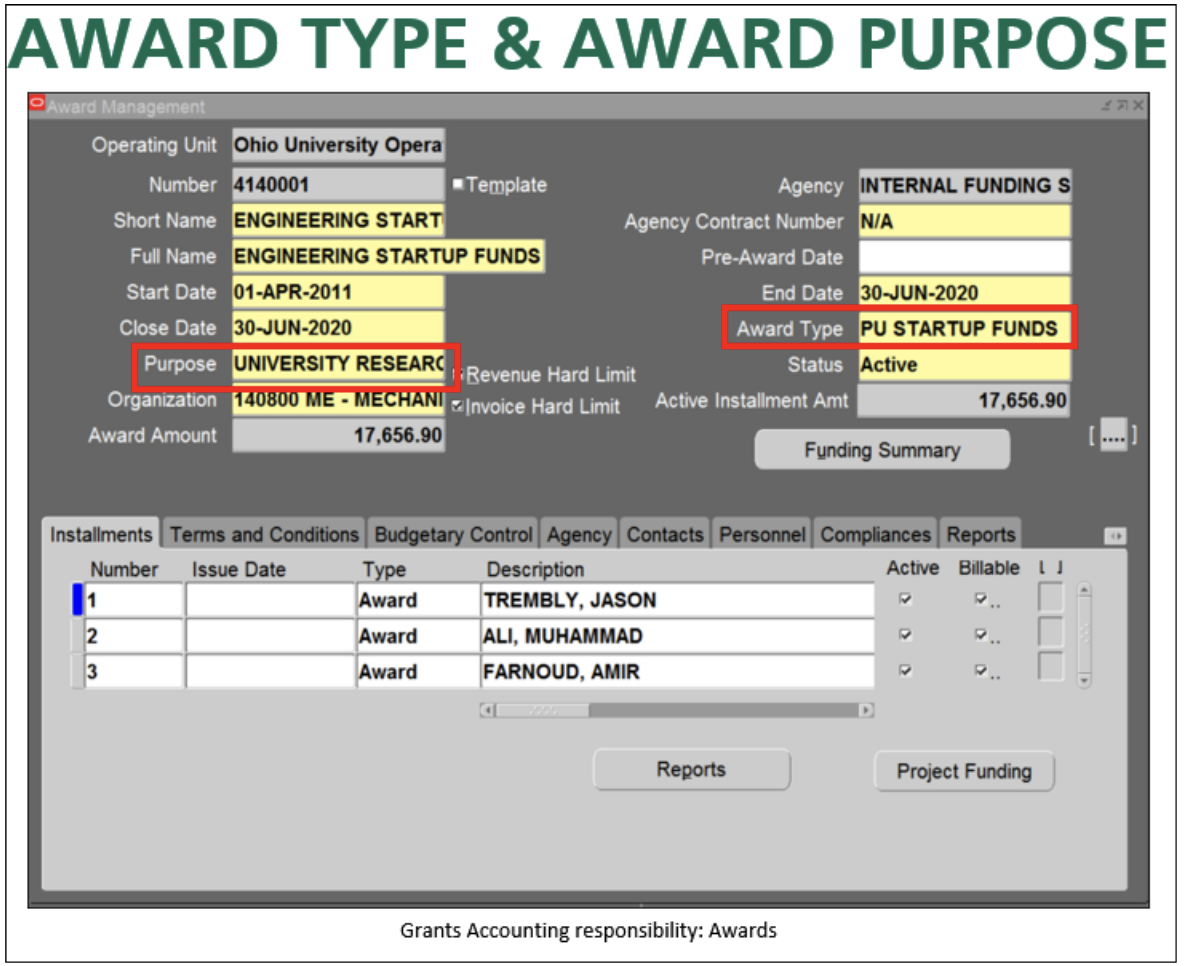
F: Award Type (Source) and Transfer Object Code
University Account Number must be used in Transfer of funding (in the Awards Descriptive Flexfield) for the following:
| Award Type | Transfer Object Code |
|---|---|
| Departmental Award (112600) | 610100 |
| Departmental Commitments - Non faculty (112700) | 610100 |
| Dept Chair Funds (112650) | 610100 |
| PU Startup Funds (112410) | 610100 |
| Baker Awards (112350) | 620100 |
| GSS TRV RES ORG WK AW (112500) | 620100 |
| Honors Tutorial (112000) | 620100 |
| Internal Awards (112100) | 620100 |
| Kopchick Endow UG AWD (112102) | 620100 |
| PURF AWARDS (112115) | 620100 |
| Research Challenge (112300) | 620100 |
| Research Incentive (112200) - Finance setup only | 620100 |
| SEA Awards (112120) | 620100 |
| UG Research Travel (112110) | 620100 |
| VPR Startup (112400) | 620100 |
University Temporarily Restricted Account Number must be used in Transfer of funding (in the Awards Descriptive Flexfield) for the following:
| Award Type | Transfer Object Code |
|---|---|
| FSP OU INTERNAL OTHER (410987) | 640300 |
Foundation Account Number must be used in Transfer of funding (in the Awards Descriptive Flexfield) for the following:
| Award Type | Transfer Object Code |
|---|---|
| FSP OUF 1804 AWARD (420982) | 640300 |
| FSP OUF BAKER AWARD (420985) | 640300 |
| FSP OUF KONNEKER (420983) | 640300 |
| FSP OUF KOPCHICK (420981) | 640300 |
| FSP OUF OTHER AWARD (420986) | 640300 |
| FSP OUF RUSS VISION (420980) | 640300 |
| FSP OUF SUGAR BUSH (420984) | 460200 |
G: Budget Decrease or Adjustment Process (not RI Accounts)
- An award that receives a budget decrease will need ALL the following steps completed:
- Decrease Budget to the correct amount in proper project and task. (see Budgeting Awards on page 29)
- Decrease Revenue by completing a Revenue event (see Compliances on page 26).
- This is processed centrally each evening after 6 pm and must be processed before proceeding.
- Decrease Project Funding to the correct amount in project and task. (see Project Funding on page 23)
- Decrease an existing Installment to the correct amount. (See Award Installments on page 22 - make sure you are changing the Direct Cost column)
- The Award Budget, Project Funding and Installment must equal.
- An award that receives a budget reallocation that nets to zero will need ALL the following steps
completed:- Decrease Budget to the correct amount in proper project and task. (see Budgeting Awards on page 29)
- Decrease Revenue by completing a Revenue event (see Compliances on page 26).
- This is processed centrally each evening after 6 pm and must be processed before proceeding.
- Decrease Project Funding to the correct amount in project and task. (see Project Funding on page 23)
- Decrease an existing Installment to the correct amount. (See Award Installments on page 22 - make sure you are changing the Direct Cost column)
- Increase new Installment for project and task being funded.
- Increase Project Funding to the correct amount in project and task.
- Increase Budget to the correct amount in project and task.
- Increase Revenue by completing a Revenue event.
- This is processed centrally each evening after 6 pm and must be processed before proceeding.
- Nightly job must process before you see revenue in the PTA.
- The Award Budget, Project Funding and Installment must equal.
H: Increase or Decrease Process for RI (Research Incentive) Internal Award
Transfers only allowable if they benefit research.
- Increase or Decrease to an RI Internal Award from a GL departmental account.
a. Complete a journal entry using the JET Tool.
i. Use object code 630200.

Increase or Decrease to an RI Internal Award from another non-RI Internal Award PTA (Project-Task-Award).
a. Follow steps in Appendix G above for Increase or Decrease to non-RI Internal Awards (Installment, Project Funding, *Event, and Budget).*NOTE: Enter planning unit default account number in the Award Descriptive Flexfield on the non-RI Internal Award. This will be the account number used on the journal entry below.
b. Complete a journal entry using the JET Tool.
i. Use object code 630200.

- Increase or Decrease to an RI Internal Award from another RI Internal Award.
a. Complete a journal entry using the JET Tool.
i. Use object code 630200.
