
OBI Finance and HR Dashboard Enhancements
March 16, 2026
Several enhancements were implemented across the OBI Finance and Human Resource dashboards last month, aimed at improving data visibility and making it easier for users to access the information.
Segment Lookup Dashboard: New HR Org Field
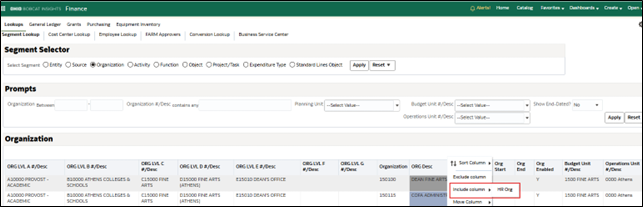
A new HR Org field has been added to the Organization segment of the Segment Lookup Dashboard. This feature allows users to quickly identify whether an HR organization exists for a specific organization.
The HR Org column is hidden by default but will automatically appear when exporting results to Data CSV or Data Excel. Users may also enable the column directly in OBI by right‑clicking on the header row and selecting Include Column.
Payroll Detail Dashboard: Includes Additional Grants‑Related Data
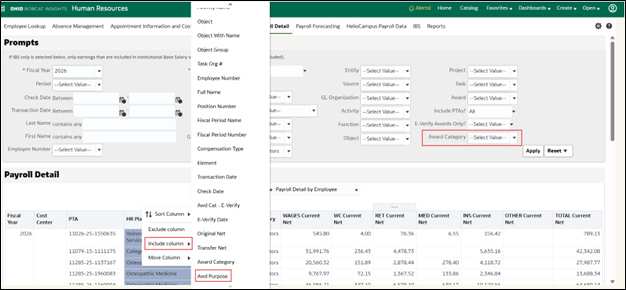
Two enhancements were implemented in the OBI Payroll Detail Dashboard, including a new prompt and column designed to give users greater flexibility in accessing grants payroll data.
- New Award Category Prompt – Allows users to filter PTAs by award category: Sponsored, Cost Share, Capital, or Internal.
- New Award Purpose Column – Displays the award’s purpose, summarized to the Function segment value in the General Ledger. Like other optional fields, the Award Purpose column is hidden by default but automatically appears in data exports. It can also be enabled through the Include Column feature within OBI.
Base Salary Listing: Department of Academic Review Added
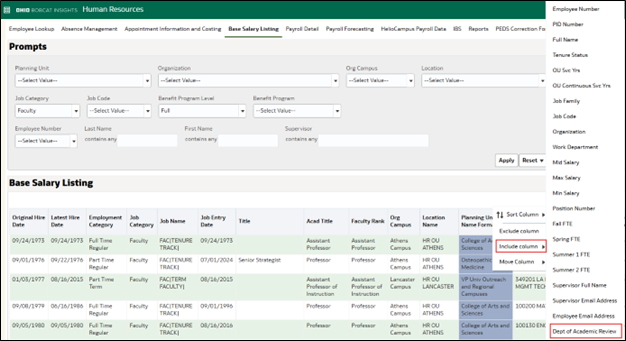
A new Department of Academic Review column has been added to the Base Salary Listing Dashboard. The Department of Academic Review column identifies the academic unit responsible for conducting a faculty member’s evaluations. Users can view this new column on the Base Salary Listing dashboard by right-clicking any column header, selecting Include Column, and choosing Department of Academic Review. The field will automatically appear in data exports.
OBI Support
Looking for a quick refresher on how to include or exclude columns in OBI, need a general overview of OBI functionality, or want guidance on a specific HR or finance dashboard? Visit our OBI Training Page to access helpful quick reference guides.
If you have questions about these OBI changes, please contact financecustomercare@ohio.edu