
Concur – How to process a Travel Advance Cash Return
Objective
The purpose of the Concur – How to process a Travel Advance Cash Return Quick Reference Guide is to provide steps on how to handle unused funds from a cash advance and to process a cash return in your Travel Report in Concur in order to substantiate your travel advance.
Return Unused Funds
Any funds left from your cash advance must be returned to the Cashier’s office with a deposit slip. Be sure to take the invoice you received with you when you return the funds. You will receive a receipt which must be attached to your Concur report.
Attach the Advance to Your Report
Step 1: Login to Concur
Step 2: Click “+” to start a new report
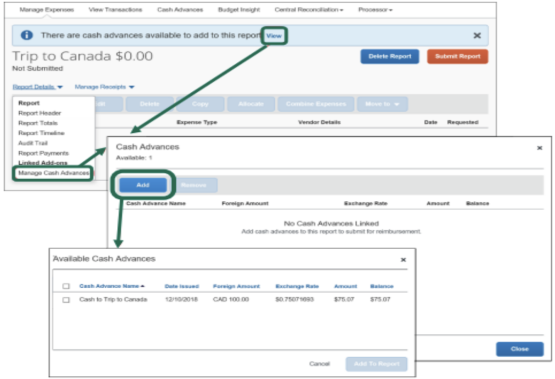
Step 3: Click “View” or “Report Details >Manage Cash Advances” to add a cash advance the Concur report.
Step 4: Select “Add”
Step 5: Select the “Available Cash Advance” to assign to the Concur report.
Step 6: Select “Add to Report”
Step 7: Add expenses that total at least the amount of the travel advance received less the amount you returned.
Add an Expense Line for the Returned Funds
Step 8: Select “Add” to add a new expense
Step 9: Select the Expense Type of “Cash Advance Return”
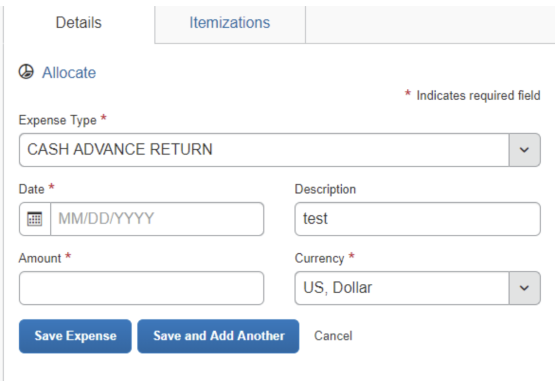
Step 11: Complete the remainder of the fields. The amount should be a credit (ex. -15.25).
Step 12: Click “Save Expense”.

Step 13: Submit your report as normal.