
Concur – How to Assign a Travel Advance
Objective
The purpose of the Concur – Assign Travel Advance Quick Reference Guide is to provide steps on how to assign your travel advance to your Travel Report in Concur to substantiate your travel advance.
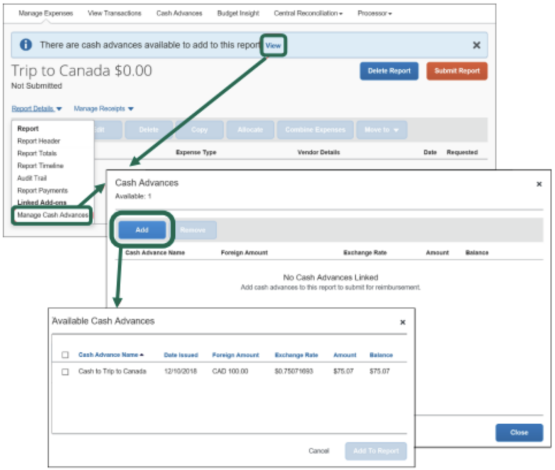
Assign the Advance to your report
Step 1: Login to Concur
Step 2: Click “+” to start a new report
Step 3: Click “View” or “Report Details >Manage Cash Advances” to add a cash advance the Concur report.
Step 4: Select “Add”
Step 5: Select the “Available Cash Advance” to assign to the Concur report.
Step 6: Select “Add to Report”
Step 7: Add expenses that total at least the amount of the travel advance received.