
Absence Management
Absence Management Dashboard
The Absence Management dashboard page is located on the Human Resources dashboard in OBI. This dashboard is used to view Paid Time Off (PTO) balances and usage for salaried administrative staff and faculty.
Dashboard Prompts
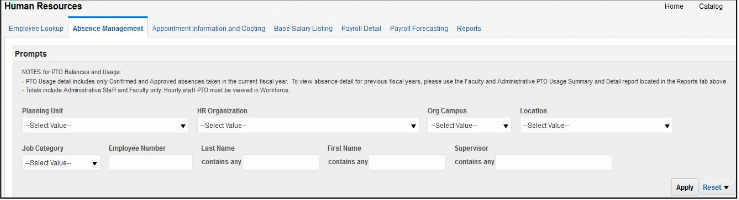
Multiple prompt options are available on this dashboard. Please select at least one prompt to limit the report by specific criteria as appropriate. Click apply once prompt(s) are selected.
Prompt Definitions
| Term | Definition |
|---|---|
| HR Organization/Planning Unit/Org Campus/Location | The planning unit, organization, campus, or location where an employee is assigned |
| Job Category | The classification of employees based on job duties within the institution (Administrators, Faculty, Research). |
| Employee Number/Last Name/First Name | If you would like to search for a specific employee, enter the employee’s six-digit employee number, or their last name/first name. |
| Supervisor | If you would like to search for a list of employees who report to a specific supervisor, enter the supervisor’s last name. |
Criteria
The following absence/PTO data is included in the dashboard:
- PTO balances and usages for salaried administrative staff and faculty only
- PTO balances and usages for hourly staff must be viewed in Workforce.
- Approved absences only
- Planned absences are only included in the Projected Balances 6/30 view. The YTD Balances view does not include planned absences.
- Current fiscal year absences only
- To view absence usage in a previous fiscal year, please use the Faculty and Administrative PTO Usage Summary and Detail report located in the Reports tab on the Human Resources dashboard.
Dashboard Results Sections
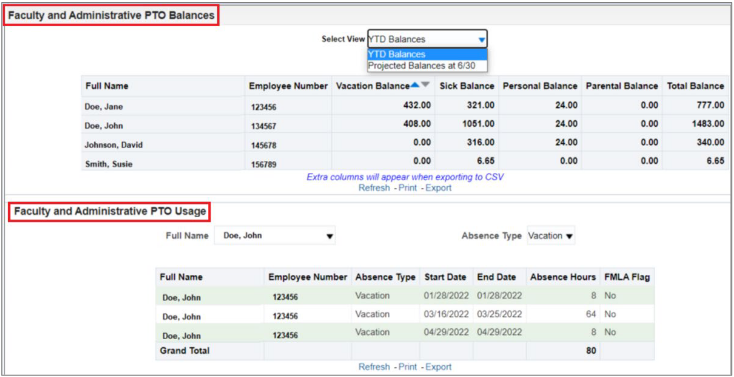
The Absence Management dashboard results contains two sections:
- Faculty and Administrative PTO Balances
- Faculty and Administrative PTO Usage
Faculty and Administrative PTO Balances Section
PTO balances are displayed in the top section of the dashboard. This section of the report contains two view options:
- YTD Balances
- Projected Balances at 6/30
YTD Balances
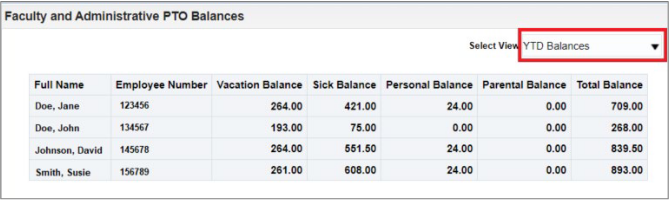
The YTD Balances view displays the current accrual balances for each accrual plan. The balance calculations do not include future accruals, planned absences, or pending approval absences. It is sorted by employee name.
Projected Balances at 6/30
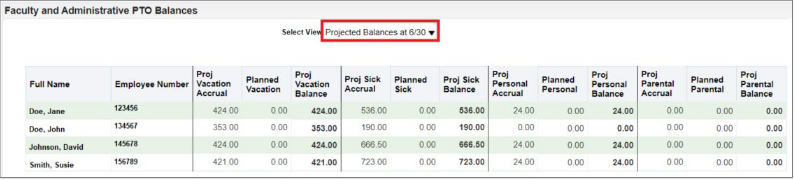
The Project Balances at 6/30 view displays the projected accrual balances as of June 30th of the current fiscal year. The balance calculations are based upon projected PTO accruals and planned absences that have been approved in Absence Management. It is sorted by employee name.
Faculty and Administrative PTO Usage Section
PTO usage detail such as absence dates, hours, etc. are displayed in the bottom section of the dashboard with drop-down menus to select individual employees and absence types. This section contains only absences in the current fiscal year that have been confirmed and approved in absence management. Planned absences are not
included in this section.
This section of the report shows one employee and one absence type at a time. Select the employee and absence type that you would like to view.
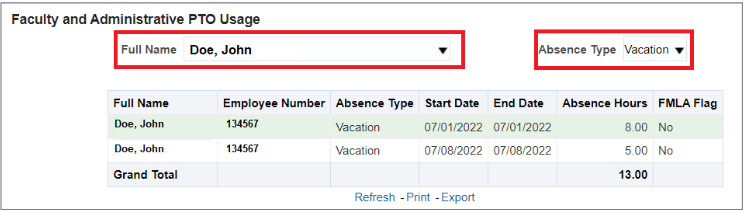
To view multiple employees/absence types, select Export > Data. See the Dashboard Exports section below for additional information about the export options from this dashboard.
Dashboard Exports
Each section of the dashboard is exported separately. You may choose to individually export the balances or usage sections of the dashboard. There are many export formats that you may choose from, including two Excel export options.
Excel Export Options
| Export Format | Faculty and Administrative PTO Balances Section | Faculty and Administrative PTO Usage Section |
|---|---|---|
| Excel | Select this export format if you would like to export only the data displayed on your screen. For example, if you wish to view only current balances or projected end of year balances, but not both. | Select this export format if you would like to export only the data displayed on your screen. This export option will allow you to export one employee and one absence type only. |
| Data > Excel | Select this export format if you would like to export both the current and projected end of year balances into a single spreadsheet, or if you would like additional columns in your export (i.e., Org, Planning Unit, and Supervisor) | Select this export format if you would like to export all the employees and absence types based upon the prompts that were selected at the top of the dashboard page, or if you would like additional columns in your export (i.e., Org, Planning Unit, Supervisor, and FMLA Reason) |
Dashboard Columns
| Column | Definition | Faculty and Administrative PTO Balances Section | Faculty and Administrative PTO Usage Section |
|---|---|---|---|
| Full Name | The employee’s full name | ✓ | ✓ |
| HR Planning Unit | The employee’s assigned planning unit | ✓ | ✓ |
| ORG LVL C #/Desc | The C- level organization for the employee’s assigned organization | ✓ | ✓ |
| HR Organization | The employee’s assigned organization | ✓ | ✓ |
| Supervisor Full Name | The employee’s supervisor | ✓ | ✓ |
| Absence ID | For internal use only – the identification number tied to the specific absence transaction | ✓ | X |
| Absence Type | The type of absence (i.e., vacation, sick, personal, or parental) | ✓ | X |
| Start Date | The start date of the absence | ✓ | X |
| End Date | The end date of the absence | ✓ | X |
| Absence Hours | The number of hours submitted in absence management | ✓ | X |
| FMLA Flag | Y/N – Y will be listed if the absence qualified for Family Medical Leave | ✓ | X |
| FMLA Reason | The reason for Family Medical Leave, if applicable | ✓ | X |
| Parental Balance | The number of parental leave hours the employee currently has | X | ✓ |
| Personal Balance | The number of personal leave hours the employee currently has | X | ✓ |
| Sick Balance | The number of sick leave hours the employee currently has | X | ✓ |
| Vacation Balance | The number of vacation hours the employee currently has | X | ✓ |
| Total Balance | The total PTO hours (vacation, sick, personal, and parental) that the employee currently has | X | ✓ |
| Proj Vacation Accrual | The end of year vacation accrual that the employee is projected to have on June 30 based upon current balances (does not deduct planned hours) | X | ✓ |
| Planned Vacation | The number of planned vacation hours that have been approved in absence management | X | ✓ |
| Proj Vacation Balance | The projected end of year (June 30 th ) vacation hours balance based upon accrual projections and planned absences that have been approved in absence management | X | ✓ |
| Proj Sick Accrual | The end of year sick accrual that the employee is projected to have on June 30 based upon current balances (does not deduct planned hours) | X | ✓ |
| Planned Sick | The number of planned sick hours that have been approved in absence management | X | ✓ |
| Proj Sick Balance | The projected end of year (June 30th) sick hours balance based upon accrual projections and planned absences that have been approved in absence management | X | ✓ |
| Proj Personal Accrual | The end of year personal accrual that the employee is projected to have on June 30 based upon current balances (does not deduct planned hours) | X | ✓ |
| Planned Personal | The number of planned personal hours that have been approved in absence management | X | ✓ |
| Proj Personal Balance | The projected end of year (June 30 th ) personal hours balance based upon accrual projections and planned absences that have been approved in absence management | X | ✓ |
| Proj Parental Accrual | The end of year parental accrual that the employee is projected to have on June 30 based upon current balances (does not deduct planned hours) | X | ✓ |
| Planned Parental | The number of planned parental hours that have been approved in absence management | X | ✓ |
| Proj Parental Balance | The projected end of year (June 30 th ) parental hours balance based upon accrual projections and planned absences that have been approved in absence management | X | ✓ |