
Object Lookup
General Ledger Chart of Accounts: Object Segment
The Object Segment:
- Defines what kind of transaction is taking place
- Categorizes values by account type for Assets, Liabilities, Fund Balance, Revenues, Expenses and Transfers
- Object Segment values are the same across planning units
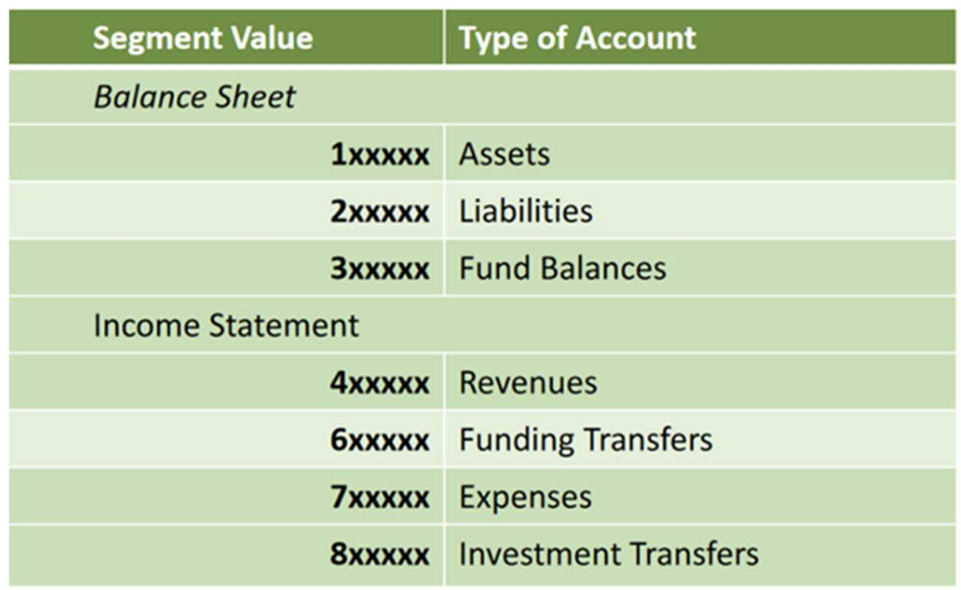
The first digit of an Object represents the major groupings shown below:
- Assets – 1XXXXX
- Represent something of value owned by the University
- Examples are Inventory, Petty Cash or Accounts Receivable - Liabilities – 2XXXXX
- Represent the University’s obligations
- Liability object codes are not commonly used by departments in charging financial activity
- Examples are Accounts Payable and Taxes Payable - Fund Balances – 3XXXXX
- Represents the difference between Assets and Liabilities on the Balance Sheet
- It’s a computed balance – no transactions are made against these object codes
- Fund balance types are Unrestricted, Temporarily Restricted and Permanently Restricted - Revenues – 4XXXXXX
- Revenues are Income
- Examples are Tuition, Lab Fees and Sales and Services - Funding and Investment Transfers – 6XXXXX and 8XXXXX
- Both types of transfers identify the movement of funds for specific activities or expenses within the University or planning unit - Expenses – 7XXXXX
- Money spent on a good or service
- Examples are payroll, supplies, travel and maintenance
Segment Lookup Dashboard Page
The Segment Lookup Dashboard details available Object Codes and their descriptions. To search for or export a list of Object Codes, first navigate to the Segment Lookup section of the Lookups tab in the Finance dashboard in OBI. Select Object and then click on Apply.

Using the prompts below, you can search a span of object codes, search an object description or search by Object Type.

| Prompt | Definition |
|---|---|
| Object Code | Six-digit value that defines what type of transaction is taking place. |
| Object#/Desc contains any | Allows you to query the Object Code, Object Description and the Parent values using specific words or numbers. Examples: Supplies, Tuition, Professor, Travel etc. |
| Object Category | Allows you to filter by the high-level categorization of Object Codes (Assets, Liabilities, Fund Balances, Revenues, Funding Transfers, Expenses and Investment Transfers) |
Object Lookup in Use
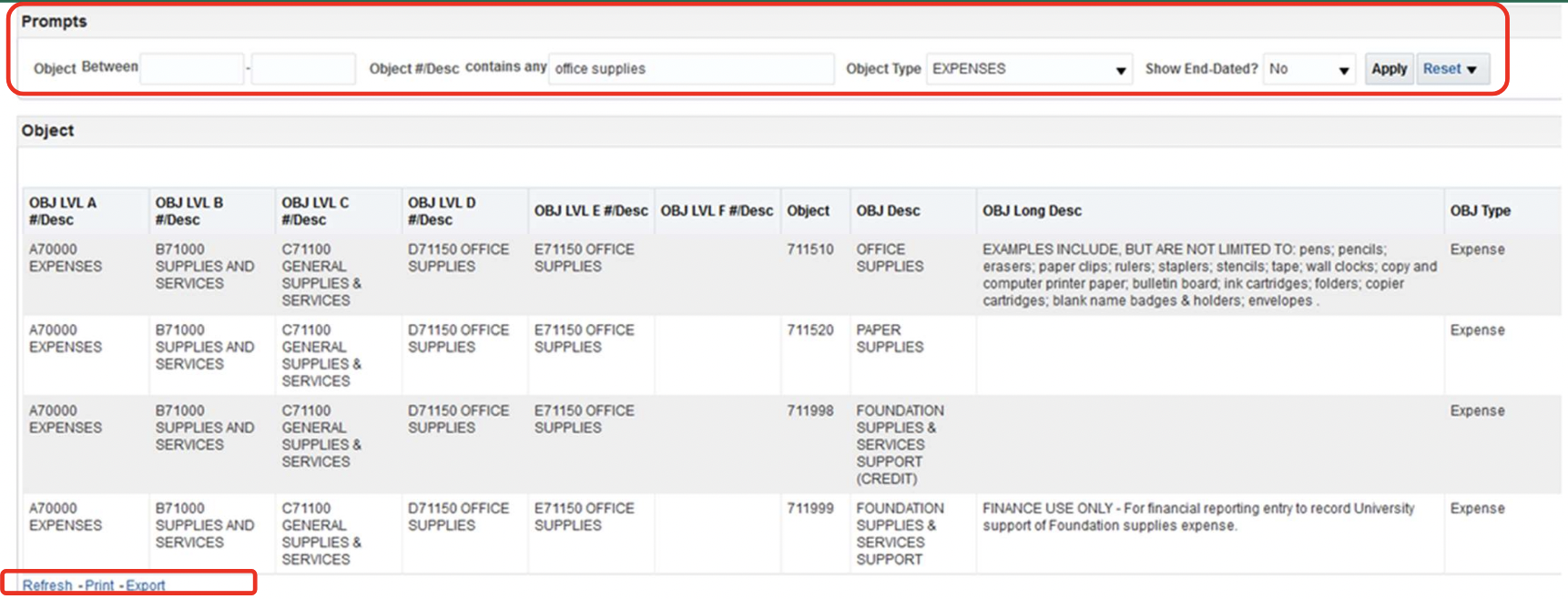
The example above is a search of Expense Object Codes with office supplies in their descriptions. Note that the Obj Long Desc field provides additional information about the object codes. To export your results, select Export in the bottom left corner of your screen.