
1095-C Form available via My Personal Information (MPI)
January 29, 2026
In accordance with federal guidelines Form 1095-C, the annual tax statement showing the health insurance coverage offered to you, is now available for download in My Personal Information (MPI)
The below instructions will guide you through the process to download your 1095-C.
Note: If you experience issues downloading the form, try a different browser (such as Microsoft Edge or Firefox).
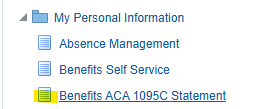
- Visit My Personal Information
Select “Benefits ACA 1095-C Statement”
Select the check box under the Consent Details heading
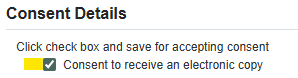
- Select Save in the upper right-hand corner of the screen
- Then select Next
Select the drop down arrow next to Year and select the year desired
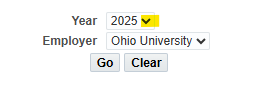
- Select Go
- Select View Latest PDF* to download the form
*Note: Pop-ups must be allowed in your browser to open or download your 1095-C.
Forms will no longer be automatically mailed to employees. If you prefer to receive your 1095‑C by mail, you can request a printed copy by emailing benefits@ohio.edu, calling 740.593.1636, or by mailing a request to University Human Resources, Grosvenor West 103, Athens OH, 45701. The statement will be mailed to the address the university has on file for you.
Additional information regarding the 1095-C is available on the Benefits Taxation webpage.
If you have any questions about your 1095‑C or need help accessing it, the Benefits Office is here to support you. Email us anytime at benefits@ohio.edu or call 740.593.1636.