
Milestone Six: Selection of Dissertation Committee
Do You Need to Complete Milestone 6 Form?
You should complete Milestone Form 6 if any ONE of the following are TRUE:
- You have an approved dissertation committee.
- You have an approved dissertation committee and have submitted college, department or program forms identifying your dissertation committee.
- You know, and your dissertation committee members know who they are, but you have not completed any forms or paper work identifying your dissertation committee members.
- You know that your committee chair is ready for you to formalize your committee
You should NOT complete Milestone Form 6 if ONE of the following are TRUE:
You have not formed a dissertation committee.
You have not received agreements from faculty (verbal or via email) to serve on your dissertation committee.
You have not talked to your advisor about a dissertation committee.
You have not talked to any faculty members about serving on your dissertation committee.
Using the bulleted lists at the top of this webpage, if you have identified yourself as someone who does NOT need to complete Milestone Form 6, you do not need to take any action at this time. If you have identified yourself as someone who does need to complete, please follow the directions below. If you have already gotten your committee approved through your home college, you DO still need to fill out this milestone form. Think of it as letting the Graduate College know what your home college already does.
How to Complete the Milestone 6 Form
Milestone 6 is a key point in the milestone forms because the committee chosen here will auto populate Milestone 7 and 9 Forms and this committee will be responsible for approving Milestones 7 and 9. Therefore, Milestone Forms 7 and 9 cannot be initiated until Milestone Form 6 is initiated by the student and all of its approvals are completed.
Instructions for First-Time App Access
Log In
While logged into to your student account, click on this link:
Permission Screen
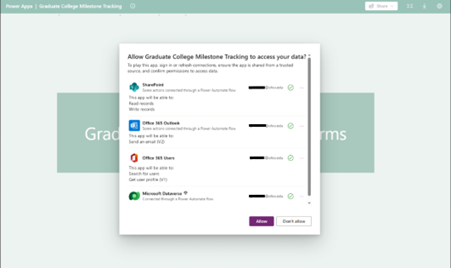
When users open the app for the first time, they will see a screen asking them to allow the app to access required data sources (SharePoint, Outlook, Office 365 Users, and Dataverse). This is expected and must be completed before the app can load.
What to do:
- When users open the app for the first time, they will see a screen asking them to allow the app to access required data sources.
- Click Allow at the bottom of the screen.
- The app will load and take you to the home screen.
Users will only need to do this once per device/browser and periodically after an update.
Refresh Required in Browser Banner
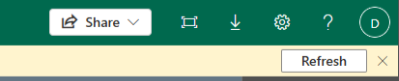
In some cases—usually after approving the app connections or after the app is updated—you may see a yellow banner at the top of the screen with a Refresh button.

What to do:
- Click Refresh when the banner appears.
- The app will reload and apply any required updates or complete the connection process.
- You may be asked to Allow the connections once more if this is your first time opening the app.
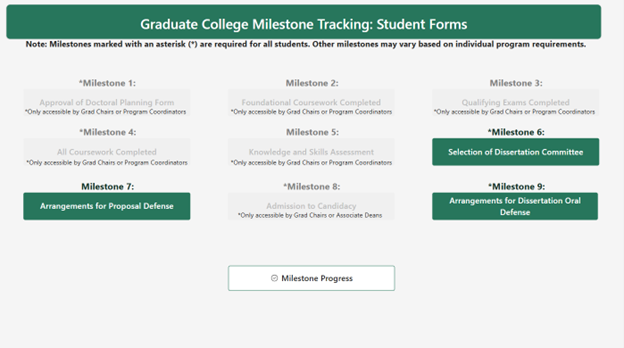
You will then be directed to the home screen, pictured below:
Features of the Home Screen
- Only milestones for which students are allowed to initiate submission will be clickable (shown in dark green).
- Milestones that can only be initiated by Graduate Chairs, Program Coordinators, or Associate Deans will appear grayed out.
- Milestones that are mandatory for all doctoral students are marked with an asterisk (*). The remaining milestones may be required by your program. Please check with your advisor or graduate chair to confirm which non-mandatory milestones are required for your program.
- Students can view milestone progress at any time using the Milestone Progress button.
Contact Dissertation Committee Members
Before submitting Milestone 6 Form, students should have engaged in discussions with the faculty they want to serve on their dissertation committee and received verbal agreements from those faculty. Because this is a new form and process, students should copy and send the email below to their dissertation committee members as a reminder of this process.
"Dear Dissertation Committee Members,
All research doctoral students at Ohio University who have an approved dissertation committee have recently been asked to complete an online form that documents members of our dissertation committee (both those internal and external to OU). When I complete MILESTONE 6 FORM: SELECTION OF DISSERTATION COMMITTEE, you will receive an email asking you to agree to serve on my dissertation committee. Please follow the directions in that email as soon as possible. If you do not confirm your membership on my committee within two weeks the approval will time out and the submission process will have to restart. Thanks for your help with this approval and for serving on my dissertation committee.
Your Name"
Inputting Committee Information
When you click Milestone Form 6 from the Milestones Home Screen, you should see the screenshot below.
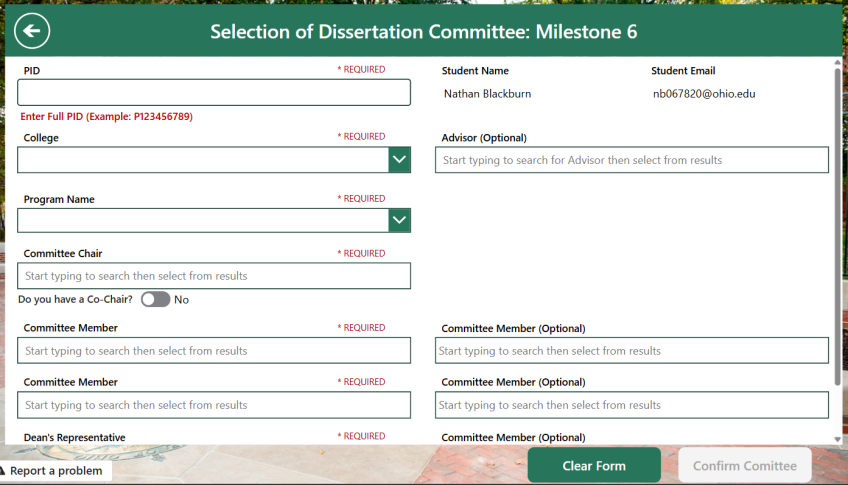
All required fields must be completed to enable the Submit Button. Students must provide their:
- PID
- College from the drop-down menu (IIP or TBS students should choose the Graduate College)
- Program from the drop-down menu
- Full dissertation committee:
- Committee Chair (required)
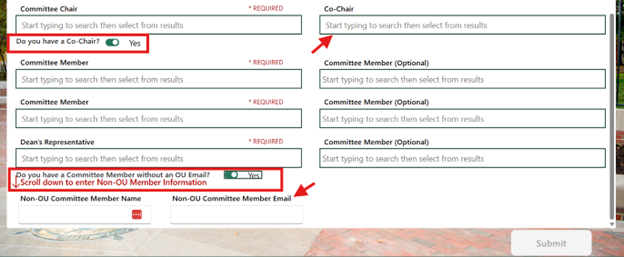
- Co-Chair (if applicable) use the toggle switch ‘do you have a co-chair?’
- Committee Members (1–5 members)
- 2 Members required if no Co-Chair
- 1 Member required with Co-Chair
- You may have more committee members than minimum required by the form or your College may require more than the form does. Any members beyond those required to submit this form should be included in the optional committee members fields
- Dean’s Representative (required) this is someone outside of your program (program’s may refer to the Dean’s Representative as an ‘outside member’)
- External Member (optional) this is a member who is not affiliated with Ohio University – use the toggle switch for ‘do you have a committee member without an OU email?’
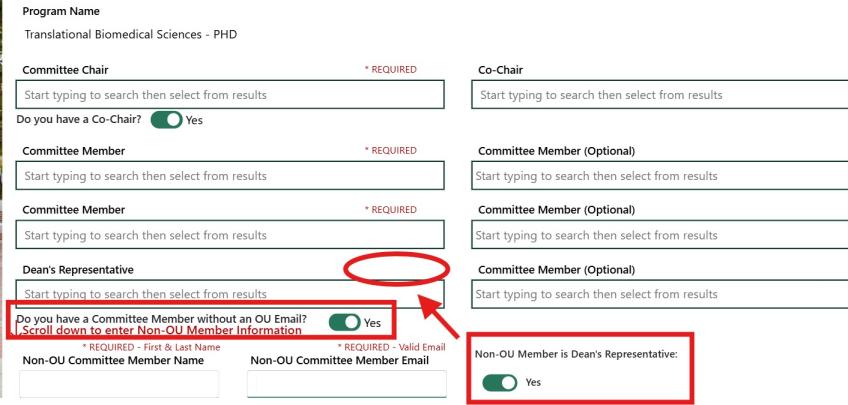
- If your external member is also acting as your Dean's Representative, toggle the switch for 'non-OU member is Dean's Representative' to yes, and the field for Dean's representative will no longer be required.
- Student Advisor (optional) this could be the same as you dissertation chair or another committee member
Optional Co-Chair and External (Non-OU) Members can be entered by switching the toggles on:
Optional External (Non-OU) Member acts as Dean's Representative by switching the toggles on:
When all required information is complete, the submit button should be clickable.
External (Non-OU) Members can have a CV uploaded alongside the submission:
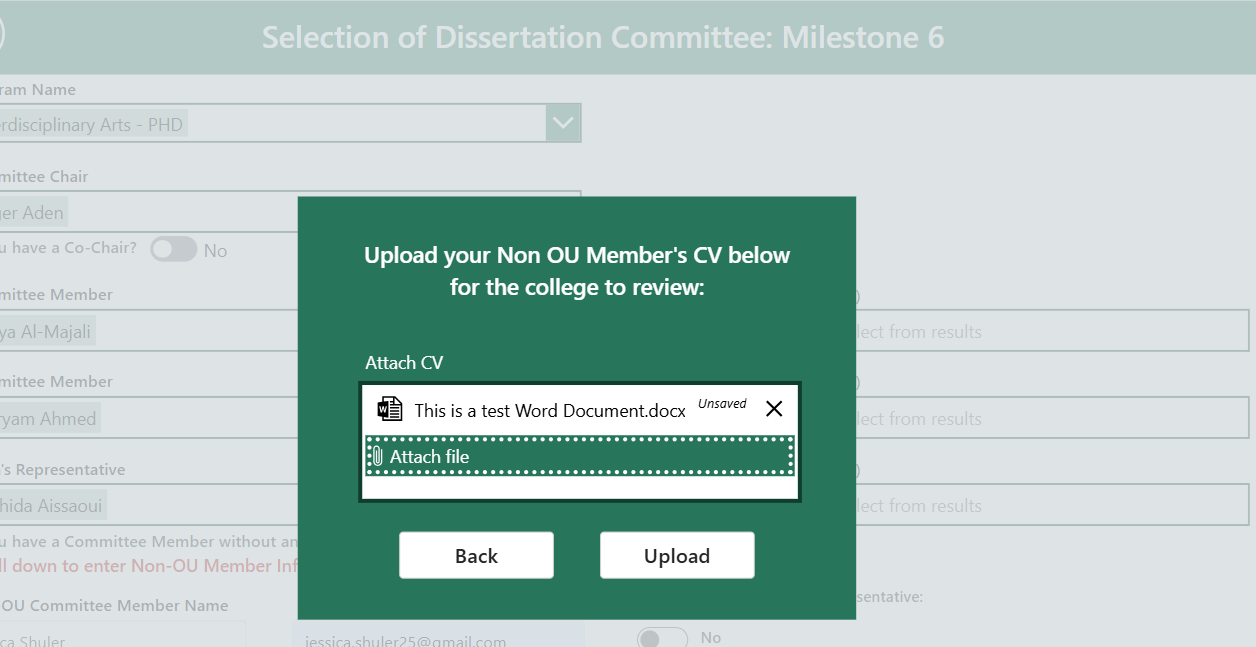
The college will be able to review the submitted document.
Approvals Triggered for Milestone 6 Submission
Approvals will be triggered in the following order:
- Graduate Chair/Program Director for your program and Associate Dean of you college
- Dissertation Committee Chair
- All other committee members including Co-Chair (if applicable), Dean’s Representative and External Member (if applicable)
Important Approval Timelines to Remember
- Faculty have 2 weeks (14 days) to approve their membership on a dissertation committee. If a faculty member rejects their membership on a dissertation committee or fails to approve their dissertation committee membership, the process will timeout and students will have to reinitiate the form.
- Students must wait for all approvals of Milestone 6 to be completed before accessing Milestones 7 or 9.
Email Notifications Sent After All Approvals Completed
- Student
- All Committee Members (including Co-Chair, Dean’s Representative, External Member, as applicable)
- College Graduate Records Manager (if applicable)
- Program Coordinator (if applicable)
- Program Director/Graduate Chair
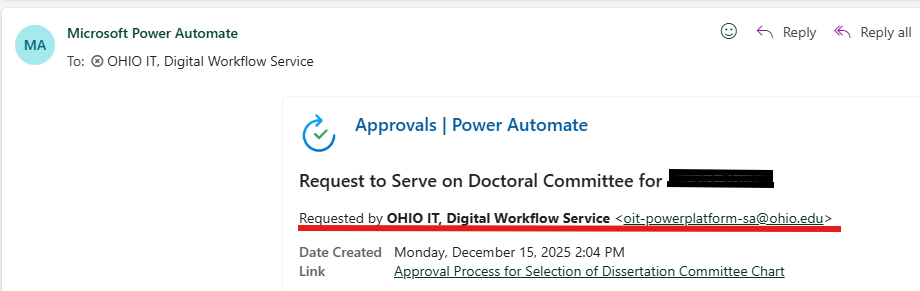
Here is an example of what committee members will see in their email:
View The Approval Workflow
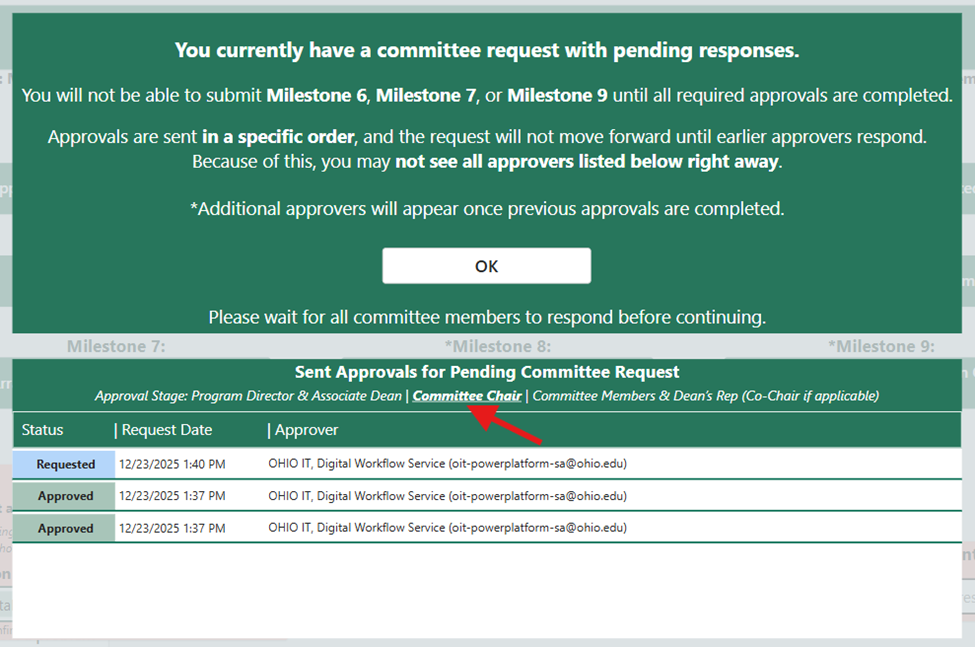
Students can now see where their submission is in the approval workflow and whose hands it is in.
Edit Dissertation Committee
If changes are needed after a dissertation committee is approved, students will return to Milestone 6 to re-initiate and submit the form with new committee members. Students cannot submit a change to their committee if a pending change is already in progress.
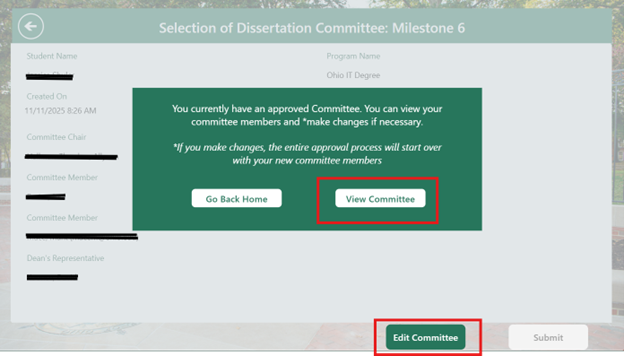
Approvals Triggered for Editing Milestone 6
Approvals will be triggered in the following order:
- Graduate Chair/Program Director for your program and Associate Dean for you college
- Dissertation Committee Chair
- All other committee members (Co-Chair, if applicable), Dean’s Representative, and External Member (if applicable)
Email Notifications Sent After Editing Milestone 6 and All Members Have Approved Changes
- Student
- Committee Members (including Co-Chair, Dean's Representative, External Member)
- College Graduate Records Manager (if applicable)
- Program Coordinator (if applicable)
- Program Director/Graduate Chair