
College Lists for Doctoral Milestones
View College Lists (College Reporting Dashboard)
Each college's Associate Dean for Research should now have access to an individual SharePoint URL that will take you to the content displayed on this webpage. If you cannot find this link, or believe it was not sent to you, please contact hallman@ohio.edu and blackburnn@ohio.edu for troubleshooting.
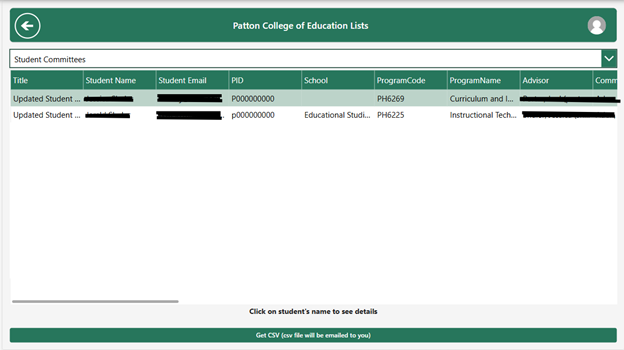
Clicking View College Lists opens a screen showing a dropdown list of available reports for the user's college.
Available lists:
- Student Committees List
- Milestones Completed List
Student Committees List
Shows all active dissertation committees for students in the user’s college.
- Click a student’s name → Opens the full committee details:
- Chair
- Co-Chair
- Dean’s Rep
- Members
- Advisor
- Program info
- Associate Dean
- Get CSV: Sends the committee list to user’s email.
Milestones Completed List
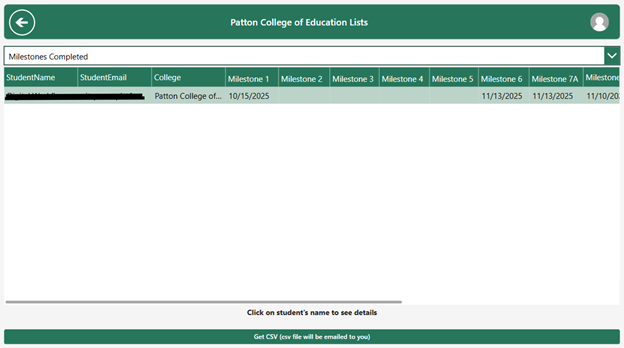
Shows completed milestone dates for all students in the user’s college.
- Click on a student’s name → Opens complete milestone history:
- MS1–MS9A/B
- Completion dates
- Uncompleted milestones left blank
- Get CSV: Sends the milestone list to user’s email.
Pop-Up Screens You May Encounter
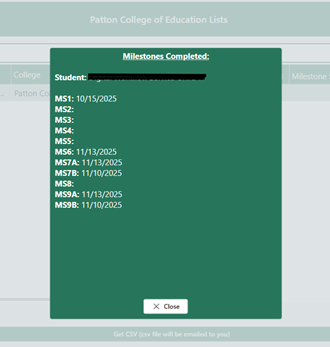
Example: “Milestones Completed” Pop-Up
Shows each milestone and the student’s completion date. Blank Milestones are not completed.
Example: “Approved Dissertation Committee” Pop-Up
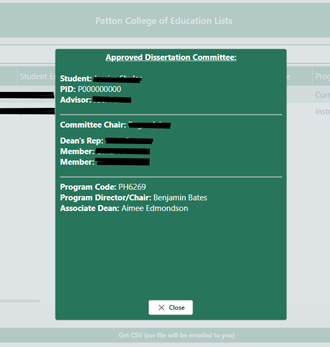
Shows:
- Student
- PID
- Advisor
- Committee Chair
- Dean’s Rep
- Members
- Program Code
- Program Director
- Associate Dean