
Slate by Technolutions for Graduate Directors
The primary documentation for Slate can be found in the Slate Tools portal. To request or update user access for Slate Reader you must fill out the Slate Request/Update User Access form.
What is Slate?
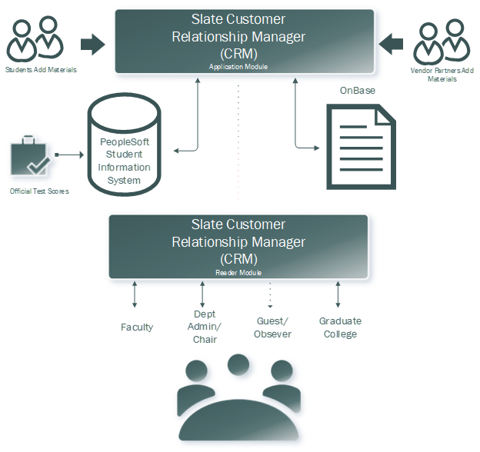
Slate is an enterprise level Customer Relationship Management (CRM) tool used by OHIO to manage recruitment and admission processing for both undergraduate and graduate admissions. Effective spring 2024, the Graduate College will replace the Graduate Review and Admission Decision System (GRADS) with Slate Reader. Much like GRADS, Slate Reader is a web-based system for reviewing applications to graduate study. Slate is integrated with other key OHIO E-Systems such as PeopleSoft and the document management and storage system OnBase. Slate is accessible (with authorization) by any faculty or staff member involved in the review and/or admission decision of applicants to graduate study. Figure 3 shows the major data flows and foundation software with which Slate integrates.
Figure 3: Slate Basic Architecture
Gaining Access
Department chairs or program directors should fill out the Slate User Access Request form to gain access and training for Slate Reader
Role Levels: Depending on how the individual interacts with the Slate tool, one of several role levels will be applied. The end user levels are:
- Administrative Staff
- Communications
- Application Reader
- Read Only access
- Committee Member access
- Recommender access
- Recruiter
- Other
For technical support please contact the Graduate Slate Administrators at: grad.slate.admin@ohio.edu and your request will be answered quickly by a Slate team member.
The table below outlines Slate user roles and permissions.
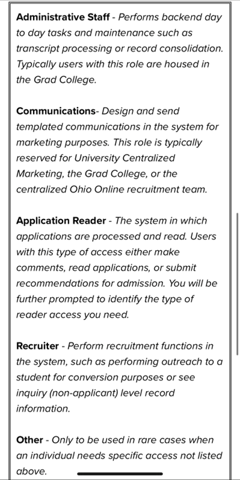
Figure 4: Slate Roles and Permissions
Data and Documents Available in Slate
Application Documents
Slate contains all of the information provided in the application process.
Data from the application will populate a main dashboard of relevant information about the applicant. Left hand navigation links provide access to the materials required by the program to complete a fully submitted application.
Review Forms
Application readers will interact with a custom review form that allows both individuals and committees to read and add comments to application files. Those users who make final admission recommendations can also request credential evaluations, waive program requirements, submit English proficiency or Bachelor's equivalency waivers, and admit, deny, waitlist or withdraw an application.
Making English Proficiency Waiver Requests
All English Proficiency Waivers are initiated in Slate Reader The waiver must be requested before the student is recommended for admission. For more information, see the section on English Language Proficiency. You may initiate a request for English proficiency waivers through Slate.
Making Bachelor’s Degree Waiver Requests
All Bachelors Degree Waivers are initiated in Slate Reader. If an applicant has not earned a US-equivalent bachelor’s degree, they are not admissible for graduate study. For more information, see the section on Application and Admission. You may initiate a request for bachelor’s equivalency through Slate.
Letters Triggered by Slate Decisions and Processes
For contents of the email messages to applicants generated by decisions in Slate, please see Appendix B.