
Preparing a Course
Title, Prefix, Course Number, and Class Number
Each course has a title, prefix, and course number. The title is the name of the course, the prefix indicates the program or department offering the course, and the number is a unique number assigned to a course to distinguish it from others offered by that department or program. The title, prefix, and course number appear in the Course Catalog. For example, for Math 1200: College Algebra, Math is the prefix, 1200 is the course number, and College Algebra is the title. The prefix and course number together are how the course is often referred to (e.g., I’m taking Math 1200).
Each instance of a course being offered is assigned a unique class number. The class number is a four- or five- digit number assigned to your class, such as 1583, which is also displayed in the catalog and it is the number students use to register for a specific section of a course. There may be multiple sections of Math 1200, but each has a unique class number. Because this is the number that uniquely identifies each section and the number that students use to register, the class number should be included on your syllabus. Also be aware that first-year students are learning this too and may not be aware of the distinction between course number and class number. When you are talking to students if one of you is talking about the course number and one is talking about class number, confusion can arise; be certain you are both talking about the same number (the course number or class number).
Accessing a Class Roster
This class roster is a list of all students enrolled in a section of the course. If you are not listed as an instructor of record, you should be working with a course supervisor who has the class roster for your class or section. If you are listed as the instructor of record, you can access your class roster, sign in to the Faculty and Advising Center and log in using your Ohio ID. Click on the teaching tab along the top menu and choose Class List/Grading. This will take you to every course for which you served as instructor of record. You can search by class or term by clicking in the corresponding box and typing the name for the class or current term. Once you identify the class, you can click on the magnifying glass, people, or pencil icons. The magnifying glass gives information about the class (start date, meeting times, location, credit hours, eligible grades). The pencil icon shows students who have requested permission to enroll in the course. The people icon shows a complete class list. Clicking on the excel or pdf icons at the upper right of the class list will export the class list as a pdf or excel file (excel files are generally more helpful).
This class list should match the students enrolled in the course on your Canvas course page. It is important to note that only students listed in the Facutly and Advising Center class list are officially enrolled in the course and earning credit for it. A student should not be attending class unless they are on this official class list. You should check the Facutly and Advising Center class list every day for the first week of class because students can add or drop classes without penalty during this time so your enrollment could change. In general, it is a good practice to take attendance daily.
Accessing Curricular Information & Materials
The most common way to find information about a course is to get information from an experienced faculty member or graduate student who has taught the course in the past or who will be teaching the course during the same semester you are. Your teaching supervisor, department chair, or graduate chair can help connect you to those who have taught or will be teaching the course. It is expected that you will ask others for their syllabus, assignment guidelines, tests or other assessments, readings, and calendar. When materials are shared with you, be sure to ask how you may use them: can you use them word-for-word, should you modify them in some way, or use them only as source of ideas? It also expected that you ask questions and talk to others in your department about the course you are teaching. You are not expected to know everything about the course you are teaching. Asking questions does not show that you are unprepared; it shows you eager to learn and taking responsibility for your professional growth.
If you are teaching a multi-section, coordinated course (link to that section) the head instructor will have documents (syllabus, calendar, assignments, learning outcomes, daily activities, assessment) already determined or in the case of daily lessons and assessments, may create them for all the sections as they come up in the calendar.
In the event that there are not individuals who have taught your course in the past or who are currently teaching it. All courses have learning outcomes constructed as part of the original course design. You can view these in OCEAN 3.0 9add link) by clicking courses along the top menu, then click course search and then typing in the prefix and course number (e.g., Math 4100). The course should populate in the list below and to view information about the course, click on the magnifying glass. Scroll down to view information about the course – what you will likely find helpful are the course description, learning outcomes, and topics, texts, and key grade factors. The course description is a general overview of the course that can be added to your syllabus.
Course learning outcomes are what the instructor expects students to know or be able to do upon the completion of the course. Typically, courses have between 5 and 10 learning outcomes. Though if your course is part of the general education curriculum or a course that is transferable to other Ohio public institutions (called OT36) it may have more learning outcomes. The topics list includes subjects that must be addressed in the course. You can include more, but this is the minimum that must be covered. Texts listed are not required but do provide a list of example readings that may be used for the course. Key grading factors indicate the percentages for determining the final grade and should be adhered to in the course you are teaching.
Writing Learning Outcomes
A learning outcome is a concise statement that describes what students will be able to do, understand, or value as a result of particular learning experience. Learning outcomes can be written for at the course-level (e.g., those you find in OCEAN 3.0), for a an individual unit of study within a course, a specific lesson, or even a specific assignment. Even though your course level learning outcomes are pre-determined, you may want to develop more specific or additional learning outcomes for your course, for individual class sessions, or even specific assignments. assignments. It is good practice to have 1-3 learning outcomes for each class meeting so that both you and students know the goal of the lesson. Having learning outcomes for assignments, can also help communicate to students the purpose of the assignment and can help you plan for how you will grad the assignment.
At Ohio University, all learning outcomes should start with “Students will be able to…” and include action word that is measurable and describes a specific observable student activity or product. Learning outcomes should be objective, observable, and measurable. For example, “be able to understand” is not measurable, “demonstrate mastery” is subjective. Instead, think about specific observable actions you want students to do. Learning outcomes should not normally describe course activities or assignments; “Students will be able to complete this worksheet or write this paper” is not a good learning outcome. The exception to this rule is in the instance where an assignment develops the ability to create a product that will be used in that field, n going forward is the goal of the course. For example, a teaching practicum course might appropriately have as a learning outcome, “Students will be able to write an effective lesson plan.”
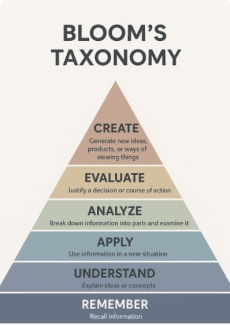
Bloom’s taxonomy is a hierarchical system that can be used to classify learning activities and outcomes. Bloom’s (as it is typically called) organizes different levels of cognitive skills and effort, from basic to more sophisticated thinking. When designing objectives, it is important to match the bloom’s level of the outcomes and activities to the rigor of the course. An introductory course is likely to have more low-level outcomes aligned with the remembering or understanding categories, whereas a senior capstone course would have more outcomes and activities aligned with creating and evaluating. It is also important for courses to have an appropriate balance of outcomes between lower-level and higher-level skills. For example, an objective at the lower levels might ask students to “identify key concepts,” while a higher-level objective could ask them to “evaluate different approaches” or “design a solution.” Using Bloom’s Taxonomy encourages intentional planning and assessment and helps ensure that learning objectives are clear, measurable, and aligned with the desired depth of student learning.
| Taxonomy | Question | Verbs | Instructional Activities |
|---|---|---|---|
| Creating (synthesis) | Can the student combine elements in a pattern not clearly there before? | combine, compose, construct, create, design, develop, formulate invent, originate, produce hypothesize | Modeling, challenging assumptions, reflection through journaling, discussions, collaborative learning activities, design, decision-making situations |
| Evaluating | Can the student evaluate according to some set of criteria and state why? | appraise judge criticize defend compare | Challenging assumptions, journaling, debates, discussions, collaborative learning activities, decision-making situations |
| Analyzing | Can the student break down into parts and forms? | analyze categorize classify compare differentiate appraise critique survey | Models of thinking, challenging assumptions, retrospective analysis, reflection through journaling, debates, discussions, collaborative learning, decision-making situations |
| Applying | Can the student use the information in a new way? | apply, use practice sketch, solve, generalize employ, execute, perform, construct, role-play | Case studies, modeling, mindful practice, authentic situations, “coached” practice, simulations, part and whole sequencing |
| Understanding (comprehension) | Can the student explain ideas or concepts? | explain describe translate discuss summarize classify illustrate interpret compare classify indicate distinguish infer express | Key examples, emphasize connections, elaborate concepts, summarize, paraphrase |
| Remembering (knowledge) | Can the student recall or remember the information? | choose describe define identify label list locate match memorize name omit recite recognize select state | Highlighting, rehearsal, memorizing, mnemonics |
Teaching Multi-Section Coordinated Courses
A multi-section coordinated course is a course that has multiple sections being offered in a single semester and are coordinated by a lead instructor, usually a faculty member, who ensures the curricular fidelity of each section. The purpose of this coordination is provide a similar student experience no matter what section of a given course a student might be in. The section of Math 1200 taught on Tuesday/Thursday at 9:30 should the same as the section of Math 1200 taught on Monday/Wednesday/Friday at 11:50. Multi-section coordinated courses are often introductory courses or courses that fulfil general education requirements and they are often courses where graduate instructors are first assigned to teaching roles, in part because there are opportunities to collaborate and learn from peers and faculty and in part because much of the work of planning the course is done by the lead instructor. If you are teaching a multi-section, coordinated course the lead instructor is responsible for making all instructional and assessment decisions related to the course. The lead instructor will have documents (syllabus, calendar, assignments, learning outcomes, daily activities, assessment) already determined or in the case of daily lessons and assessments, may create them for all the sections as they come up in the calendar.
Sometimes a lead instructor will seek input from the other instructors and teaching assistants to help develop assessments/assignments or to get feedback on an assignment/assessment that has already been created. Your primary responsibilities are to plan the details of each class session you lead being sure to keep students engaged, address student questions, and cover required content; grade student work as assigned by the lead instructor, and have regularly scheduled weekly office hours where students can come to you for questions and extra help.
The level of oversight a lead instructor provides to graduate instructors or teaching assistants can vary widely and may depend on the course, lead instructor preferences, and instructional goals. In some cases, the lead instructor may offer detailed guidance, such as providing lecture notes, prepared PowerPoint slides, specific activities, labs, examples, or classwork to be completed. In other cases, graduate students instructors and teaching assistants the flexibility to decide how best to cover the learning objectives. Because expectations can differ, it is essential to communicate regularly with your lead instructor to clarify what is expected for your daily preparation and teaching. Clear communication helps ensure consistency for students and supports your teaching success.
Often times the head instructor will meet on (semi-) regular schedule with everyone teaching the course to discuss what content is coming up and to ensure all sections are covering the same information. This meeting is a good opportunity to ask questions about pedagogy in general or teaching your specific course. If your coordinated course does not have a regularly scheduled meeting with the lead instructor, it could be because most of the instructional team has taught the course before and feels comfortable with the course materials and activities. You are always welcome to suggest that the full team meet on a regular schedule or request that the lead instructor or another experienced instructor meet with you to help you feel prepared and answer your questions.
Canvas Learning Management System
Canvas is Ohio University’s online learning management system. It is used for both in-person and online courses. An abundance of Canvas resources are available for instructors. At a minimum a Canvas course page should include the syllabus, calendar, assignments, and students’ grades. Canvas is generally user friendly and there are course templates available on the Canvas resources page, which can help with the initial set-up. If you are pressed for time, you can also google any canvas related question you have (e.g., “How do I enter student grades in Canvas?” or “How do I post a class announcement or syllabus?”) and helpful step-by-step guides can easily be found. Be aware that Canvas instructions and tips you find online do not have to be associated with Ohio University to be helpful. Lots of U.S. universities use Canvas and its set up and functionality are generally consistent across institutions.