
Cayuse Human Ethics
What is Cayuse Human Ethics?
Cayuse is the online platform used by Ohio University for several research-related functions. Cayuse contains multiple modules, or "products," some of which you may or may not have access to depending on your role at the University and the type of research you do. Human Ethics is the module used for submitting research protocols for IRB review or an exempt determination, as well as requesting an IRB reliance agreement or a "not human subjects research" determination. This webpage contains instructions and tips for submitting in Cayuse Human Ethics. If you have a question that is not answered here, please email compliance@ohio.edu.
How Do I Access Cayuse Human Ethics?
The link to access Cayuse is https://ohio.app.cayuse.com/. All regular faculty and staff will be able to log in to Cayuse using their Ohio University login. Students will need to request the creation of a Cayuse account by completing this form: https://ohio.qualtrics.com/jfe/form/SV_9YzUQ29O9A0POCO Please be aware that accounts are created manually and this process can take around two business days.
External researchers who are not affiliated with Ohio University will not be able to access Cayuse.
You will begin on the Cayuse home page. Please note that while there is a "my tasks" header on this screen, no Human Ethics tasks will appear on the home page. You must navigate to the Human Ethics module to see your IRB studies, including things that need your attention and response.
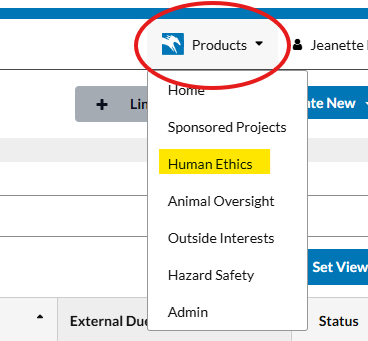
On the Cayuse home page, you will see a "Products" drop down menu in the upper right corner of the screen. In that drop down menu (your available options may vary from the example image below), click on "Human Ethics."
How Do I Start a New Initial Submission?
On the Human Ethics dashboard, you will see the blue "New Study" button on the upper right of the screen. Clicking that will open a screen where you can enter your study title. Your study title should be concise but appropriately descriptive as to the topic and nature of the research. Enter the title and then click the blue checkmark. You will be taken to the "study details" page where the button in the upper right corner now says "New Submission." At this time, your only option will be "Initial." Select "Initial" and you will be taken to a screen with a link to "edit" your submission form.
See detailed step-by-step instructions for submitting Initial submissions here.
How Do I Respond to Reviewer Comments?
Usually, you will receive at least two rounds of revision comments. First, ORC staff will pre-review the submission for completeness, consistency, and general alignment with policies, procedures, regulations, and Ohio University guidance. For non-exempt research, the submission will then be reviewed by one or more members of the IRB and in most cases, will provide a second round of revision comments.
To address these comments, the study team will need to make the necessary changes by revising answers in the Initial submission form, including replacing uploaded documents with new versions if applicable. Revisions may affect more than one section of the form, so review for consistency before resubmitting. Each review comment must be toggled to "addressed" before Cayuse will allow you to complete the submission. Resubmitting follows the same steps as when first submitting, with the exception that only one study team member needs to certify the form (though Cayuse will send everyone an email).
See detailed step-by-step instructions for replying to review comments here.
How Do I Submit a Request for a Not Human Subjects Research Determination?
Follow the same steps outlined in "How Do I Start a New Submission" above. You will use the same form, but you will answer the questions in Section 1 to explain why the project is not research, or why it does not involve human subjects.
How Do I Submit a Deferral (IRB Reliance) Request?
Follow the same steps outlined in "How Do I Start a New Submission" above. You will use the same form, but you will answer the questions in Section 2 to reflect that you are requesting Ohio University to defer review to another institution's IRB.
How Do I Modify My Previously Approved Submission?
Once your study is approved, you must follow approved procedures and use the approved documents, unless you submit a Modification request and receive approval for the changes. You also need to submit a Modification request to add or remove study personnel.
On your Human Ethics dashboard, you can see all of your studies under "My Studies." Click on the IRB number of the study you wish to modify, and then on the "Study Details" page, click "New Submission," and select "Modification" from the available options in the drop-down menu. On the "Submission Details" page, you will see the "edit" option for the submission. In the "modification" section of the form, you will answer the questions and describe the changes to be made and explain why they are being made. Please be sure to list all changes you make to the form. You will then edit the relevant sections of the form to reflect the proposed modification. If replacing documents that will no longer be used, remove the previous version and upload the new version.
See detailed step-by-step instructions for submitting Modifications to approved studies here.
What Should I Do When My Study's Admin Check-in Date Arrives?
Exempt studies and most expedited studies are not subject to an expiration date and continuing review, and instead are issued an "Admin Check-in Date." The purpose of the Admin Check-in Date is to remind researchers to keep their study records up to date. When the study is completed, it should be closed in Cayuse.
My Study Has an Expiration Date - How Do I Submit a Renewal?
Some expedited studies - usually those that are enrolling vulnerable populations such as minors - and all full board studies do have an expiration date.
See detailed step-by-step instructions for submitting a Renewal request here.
My Study Is Complete - How Do I Close it in Cayuse?
To close your study, navigate to the "Study Details" page in Cayuse Human Ethics and then select "New Submission" and then "Closure."
See detailed step-by-step instructions for submitting a Closure request here.
How Do I Report a Protocol Deviation or Unanticipated Problem?
Any departure from the approved research procedures, and any unanticipated problem, must be reported using the Incident submission type in Cayuse Human Ethics. Rarely, noncompliance may occur when there is not an approved IRB protocol in Cayuse, for example, if someone conducted research with human subjects without prior approval. In those rare situations, please email compliance@ohio.edu to begin the reporting process.
See detailed step-by-step instructions for submitting an Incident report here.
How Do I Submit a Conflict of Interest Disclosure Related to Human Subjects Research?
Please see: Conflict of Interest: Ohio University IRB Procedure for Ohio University Researchers
FAQ and Troubleshooting
- I'm trying to add someone as study personnel in my submission but I can't find their name.
- They likely do not have an active Cayuse account. Remember that students need to request the creation of their account (and student accounts will be periodically purged when they have graduated and left the University. Similarly, adjunct faculty also need to request the creation of an account.
- I received an email from Cayuse saying I needed to certify a submission, but when I go to "my tasks" on the Cayuse Human Ethics dashboard, I don't see any tasks waiting for me.
- Usually, this is because the study is being resubmitted after being returned for changes, and unlike the first time it is submitted, resubmissions only require one member of the study team to certify. So likely, the person who has submitted has also certified, which is why the task is no longer available. Occasionally, the reason is because you are still on the Cayuse home page and have not yet navigated to Human Ethics under the Products drop down menu.
- How do I upload my CITI training?
- You do not need to upload your CITI training into Cayuse. You do need to ensure that the primary email address on your CITI account is your OHIO email address. CITI and Cayuse will sync once per day based on OHIO email addresses. Because the sync happens once per day, it may take up to 24 hours for newly completed training to show up in Cayuse. You will still need to upload CITI training for external researchers, which you can do in section 5 of the form. You will also need to upload documentation of HIPAA training in Vector/Canvas, when applicable, in section 5.