
How to Guide 007: Cayuse Animal Oversight Features - Keep Your Team Informed
Introduction
- Purpose - This guide is intended to help Principal Investigators (PIs) and PI Group members utilize Cayuse Animal Oversight features that promote awareness of protocol activity and approvals. Ensuring that key personnel receive relevant notifications and have access to current protocol information can help align day-to-day research activities with the most recently approved version of the protocol and reduce the risk of noncompliance.
- Scope/Audience- Principal Investigators (PIs), PI Groups Members, Non-PI Group Members.
Key Features
This guide highlights three simple features that can help ensure study team members receive important notices, maintain access to protocol information, and work from the most current IACUC-approved version of the protocol. Learn how to:
✓ Share protocol notifications with key personnel
✓ Allow protocol access through PI Groups
✓ View and distribute approved protocol copies
✓ Track protocol changes and version history
✓ Improve communication and awareness within your research team
1) Email Notifications- Protocol Actions
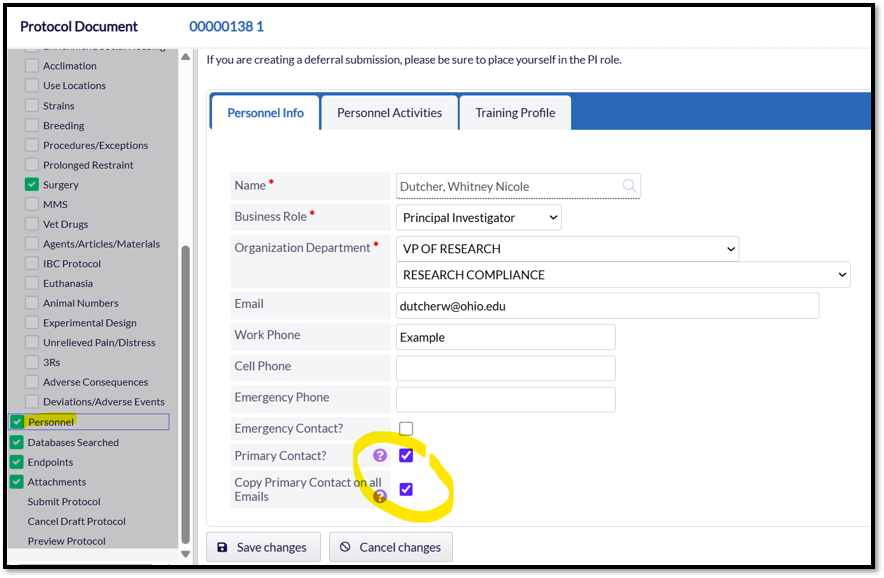
Did You Know?- Not all study team members automatically receive Cayuse notifications when actions occur on a protocol. One simple way to keep key personnel informed about approvals, revision requests, and other protocol activities is to designate them as a Primary Contact and enable the option to copy the Primary Contact on all emails.
Step 1: Navigate to the Personnel page and select the study team member(s) you would like to receive Cayuse notifications related to the protocol.
Step 2: Within the team members' Personnel Info section, check the following boxes:
- Primary Contact?
- Copy Primary Contac on All Emails
Once enabled, the designated individual will receive copies of protocol-related communications, helping the study team stay informed.
2) Protocol Version Preview
Ensuring that your study team has access to and is following the most recently IACUC-approved version of the protocol is an important part of maintaining compliance. The Protocol Version Preview feature provides a simple way to review previous protocol versions and access the current approved protocol of record.
Using this feature, you can view the most recently approved version, generate a PDF copy for electronic distribution, or print a hard copy for study team reference. Sharing the current approved protocol with personnel helps ensure that animal activities are conducted in accordance with approved procedures and that all team members are working from the same information.
The steps below will show you how to use this feature.
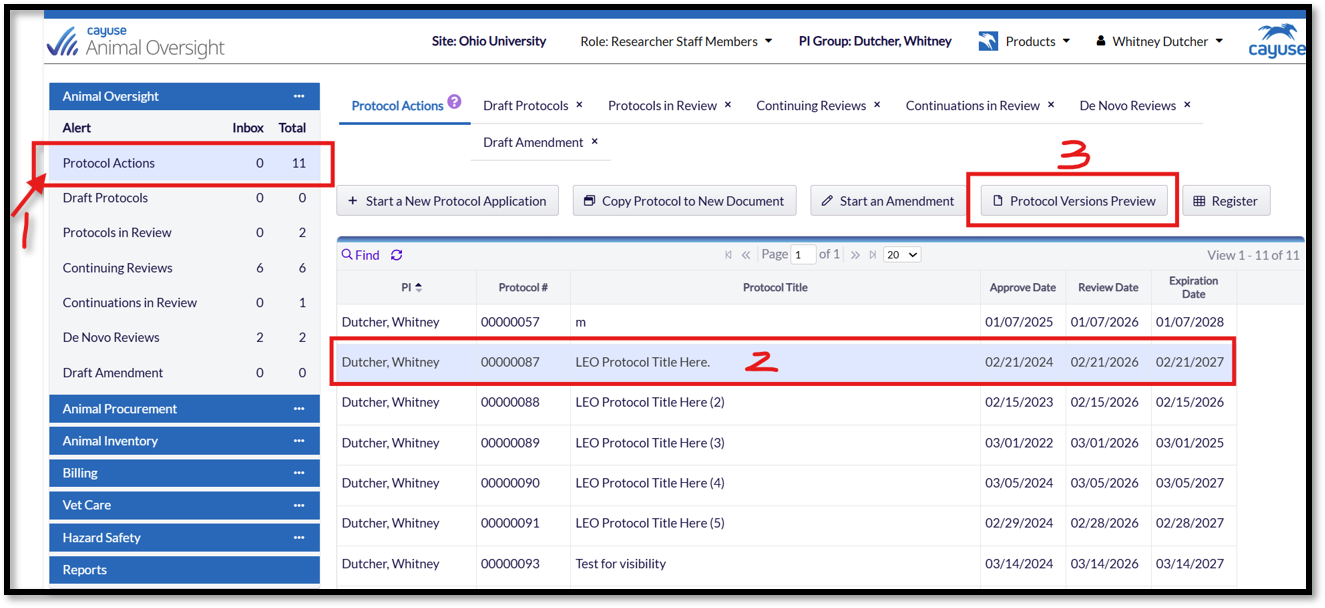
Step 1: Locate the Protocol Actions section of the Actions Menu to display your list of protocols. Next, click on the row containing your protocol you wish to view, the row will turn blue when selected. Finally, press the "Protocol Versions Preview" button.
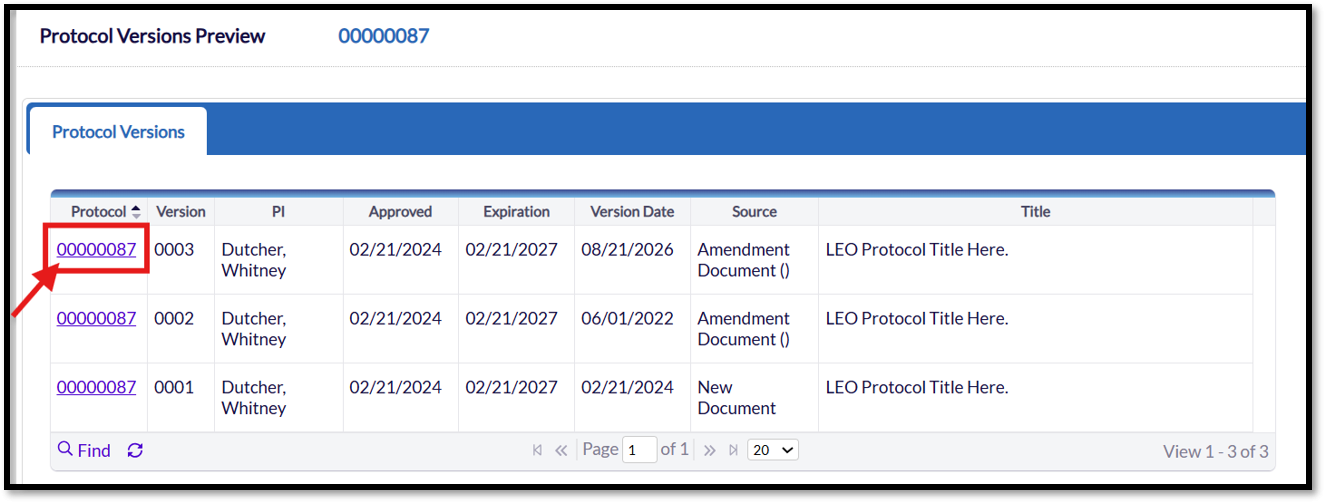
Step 2: The next page displayed is the Version History page. To ensure that you and your study team are referencing the most recently approved protocol, select the protocol version with the latest approval date and version date.
Important: A common misconception is that the protocol history is cumulative. It is not. Each approved version replaces the previous version as the official protocol of record. Think of the versions as a stack, with the most recently approved version at the top. The IACUC will evaluate study activities against the approved protocol version at the top of the stack.
Click the hyperlink for the most recent protocol version. In the example below, Version 3 is the current protocol of record because it is the most recent version at the top of the stack.
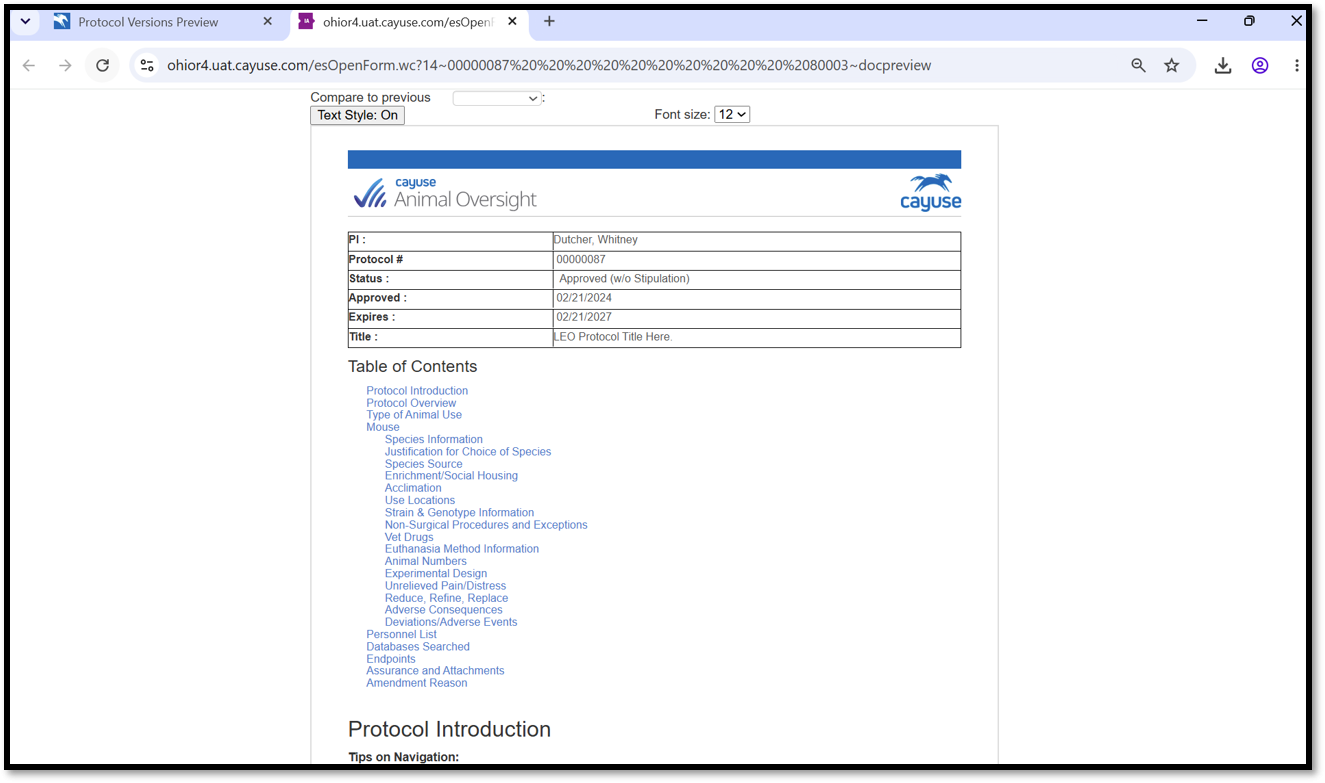
Step 3: The images below showcase the Protocol Version Preview. This preview is highly interactive and provides several useful tools for reviewing protocol content.
You can click the hyperlinked section titles to navigate directly to major sections of the protocol and view their contents. You may also use the Ctrl + F search function to quickly locate key terms or phrases within the document.
The Compare to Previous Versions feature can be especially helpful for identifying content that has been added, modified, or removed over time.
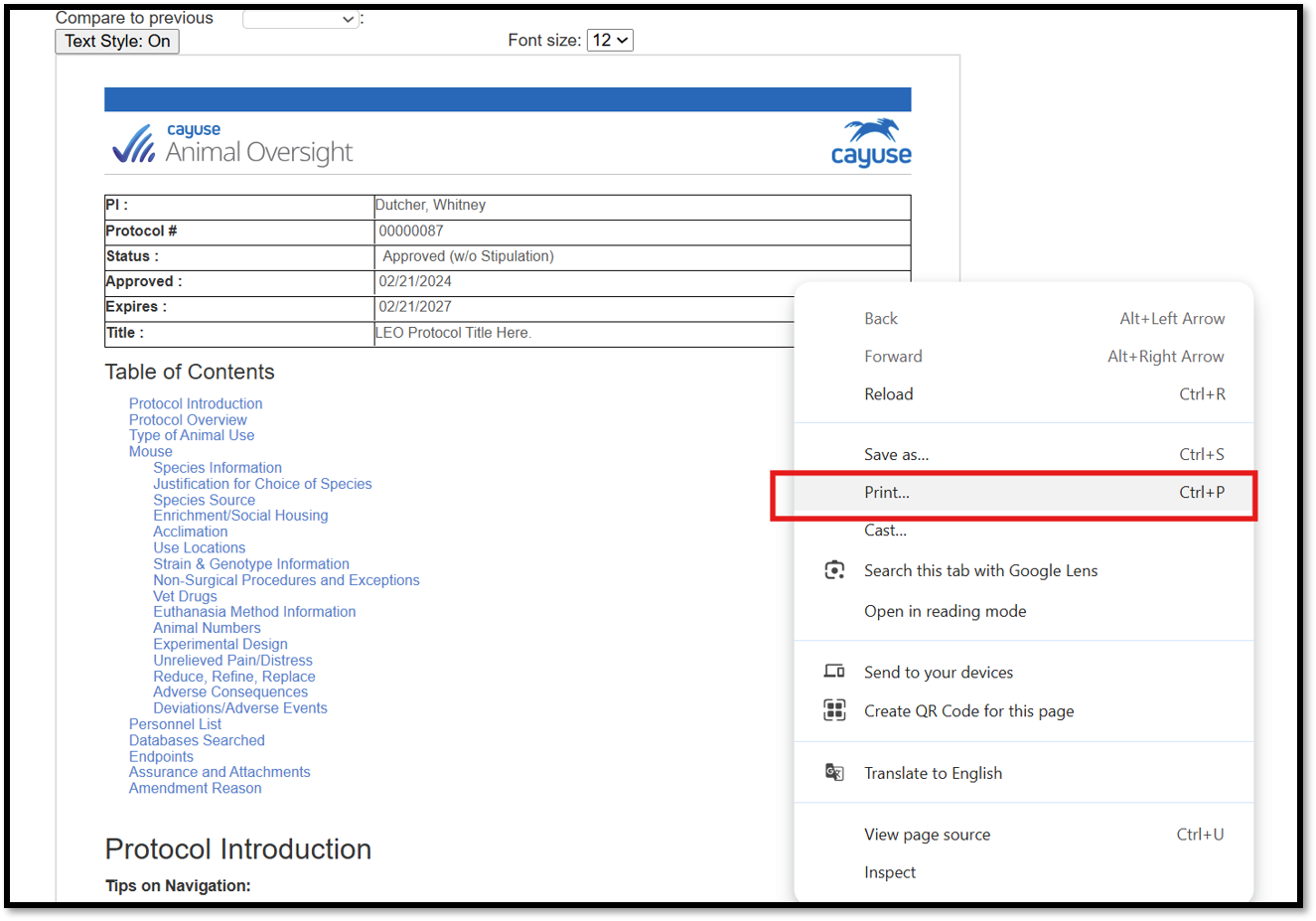
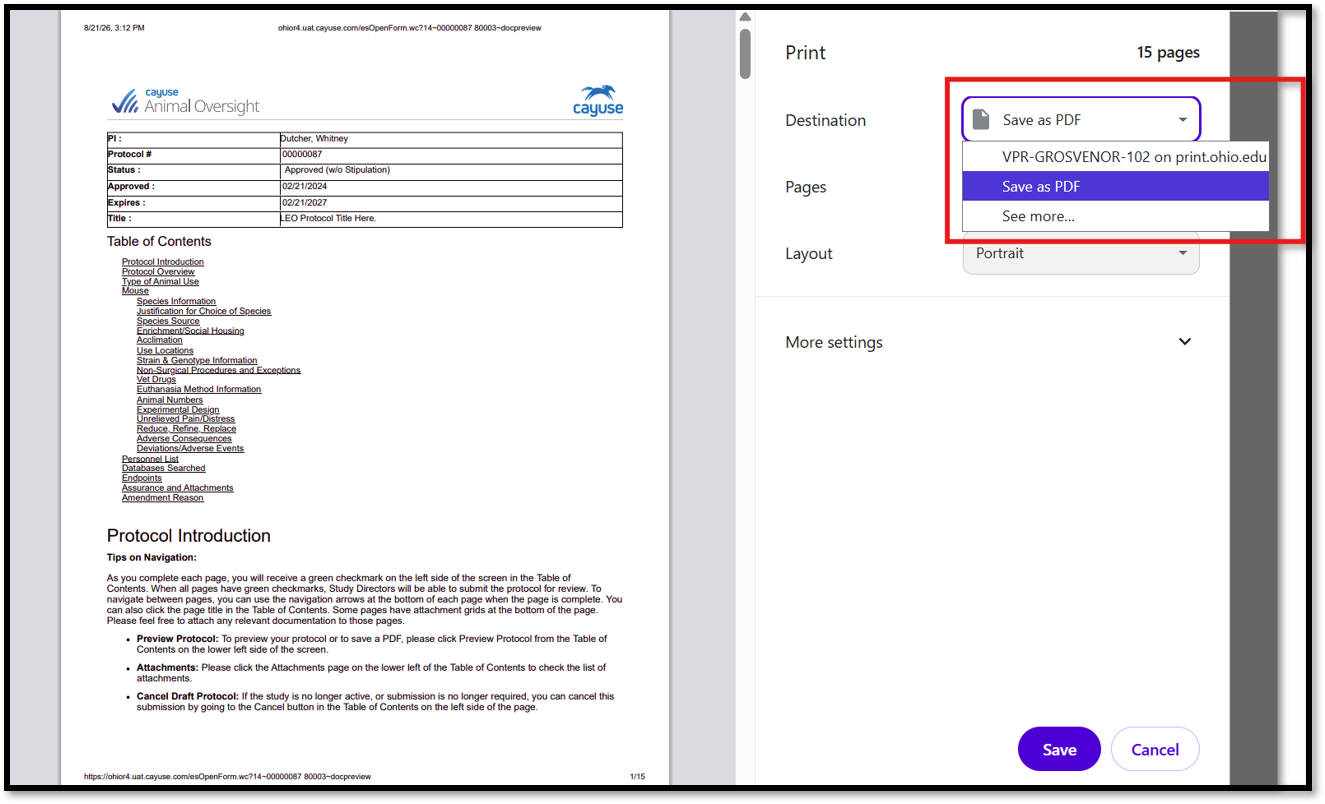
Step 4: Another valuable feature of the Protocol Version Preview is the ability to print the protocol, either electronically as a PDF or as a physical copy. To do so, simply left click on your screen and select Print and choose your preferred format. Printed or electronic copies can then be shared with study team members for reference.
NOTE: Please ensure that your study team is informed whenever a new protocol version becomes available. Maintaining version control is critical to regulatory compliance and study oversight. For teams that use printed copies, we recommend shredding previous versions as obsolete before distributing the latest approved version. This helps ensure that all team members are referencing the current protocol of record.
3) PI Group Access: Keeping Your Study Team Connected
PI Groups are one of the most useful features in Cayuse for maintaining protocol access and keeping study teams informed. Unlike study team personnel listings, PI Group membership grants access to view and edit protocols associated with a PI. This allows designated team members to assist with protocol management, view protocol content, and initiate common activities such as Amendments, Continuing Reviews, and De Novo renewals.
Benefits of PI Groups
- Provide designated team members with access to the PI's protocols in Cayuse.
- Allow team members to view approved protocol content and monitor protocol status.
- Enable members to use tools such as Protocol Version Preview to review the current protocol of record, search protocol content, compare versions, and print copies for study team reference.
- Help ensure continuity when the PI is unavailable by allowing trusted personnel to assist with protocol administration and preparation of submissions.
Best Practices
To maximize the benefits of PI Groups, consider including at least one individual who routinely supports protocol oversight and communication within the laboratory or research program.
Having a knowledgeable PI Group member in a leadership or supervisory role can help ensure that protocol changes, approval notices, renewal deadlines, and other important communications are shared with the broader study team in a timely manner.
Important Reminder
PI Group members can help draft and manage submissions, but only the Principal Investigator can provide the final approval and formally submit protocols, amendments, continuing reviews, and renewals to the IACUC for review. If the PI approval step is not completed, the submission will not be received by the IACUC Office.
Tip: Even if your study team primarily relies on the PI for protocol management, having at least one trusted PI Group member provides an additional layer of oversight and helps ensure that the current approved protocol remains accessible to those responsible for day-to-day study operations.
Requesting a PI Group
- Contact the Office of Research Compliance at compliance@ohio.edu and request the creation of a PI Group. Requests must come from, or be approved by, the Principal Investigator (PI).
- The Office of Research Compliance will create the PI Group and add the approved members. PI Group access applies to all protocols associated with that PI.
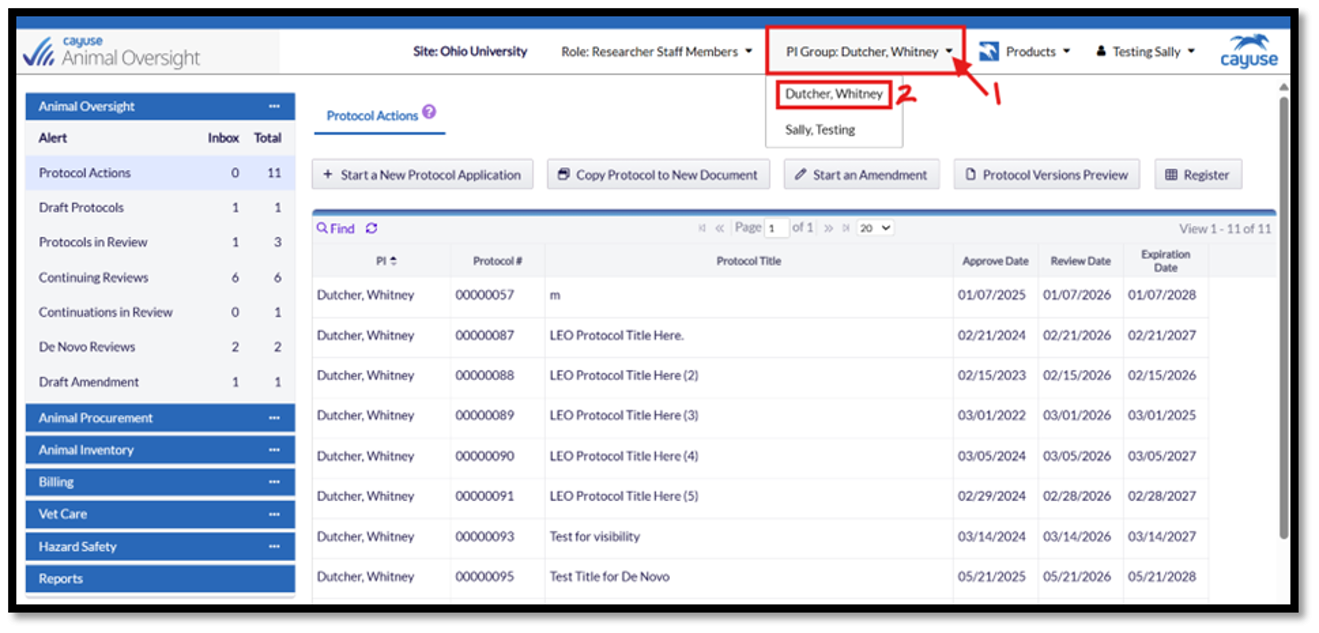
- PI Group members can then access the PI's protocols by selecting the PI from the PI Group drop-down menu within Cayuse Animal Oversight.
For detailed instructions on accessing and using PI Groups - How-to Guide 001: Understanding Protocol Access & Dashboard Navigation in Cayuse - A Guide for PI Group Members.
Have Questions?
Our goal is to create resources that are practical, easy to follow, and respectful of your time. While we strive to cover the most common Cayuse features and processes, these guides are intended to be quick reference tools rather than comprehensive manuals.
If you have questions, encounter challenges while using Cayuse, or need assistance with a situation not covered in this guide, please contact the Office of Research Compliance at compliance@ohio.edu. We are always happy to help.
We also welcome feedback and suggestions for future guides and training materials. Your input helps us improve these resources and better support the research community.