
Drop-In Tutoring
AAC Tutoring Runs from Week 2 through the final day of classes (No standard Tutoring is available during Finals Week). Please check the AAC Instagram for Updates on Final Exam Reviews.
Students are invited to attend Drop-In Tutoring to work together with the support of trained tutors. Tutors can provide general support for questions during the days and times listed. If additional support is needed, tutors can also assist students in locating scheduled sessions for a later date.
*Course Coverage may vary by day & time. Please use the TracCloud Search for daily schedule updates and additional details
Drop-In Tutoring
Our Fall 2026 Drop-In Tutoring Schedule will be made available as tutor schedules are finalized, expected by August 28th, 2026. See you soon!
| Subject | Courses* | Location | |
|---|---|---|---|
| TBD | TBD | TBD | TBD |
Digital Learning Lab Drop-In Schedule
The AAC is proud to offer a brand new service, dedicated to helping our students navigate the digital learning tools associated with certain courses. For this semester we are offering support with SPSS, ALEKS, and Excel. Please check TracCloud for specific program availability.
| Day | Time | Location |
|---|---|---|
| Monday | TBD | TBD |
| Tuesday | TBD | TBD |
| Wednesday | TBD | TBD |
| Thursday | TBD | TBD |
How to Find the Drop-In Schedule
Step 1: Log in to TracCloud
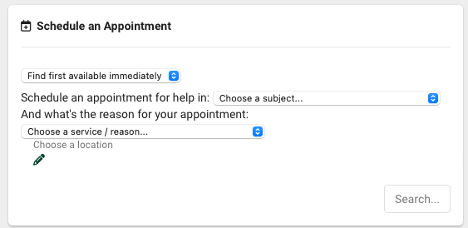
Step 2: Locate the "Schedule an Appointment" widget on the dashboard. It will look like this:
Step 3: Enter your course number (ex. Math 1200 for college algebra) using the Choose a Subject drop-down menu
Step 4: Click Search. A window will pop up with availability for the next 8 days. No need to pre-schedule - just stop by at the listed time & location.
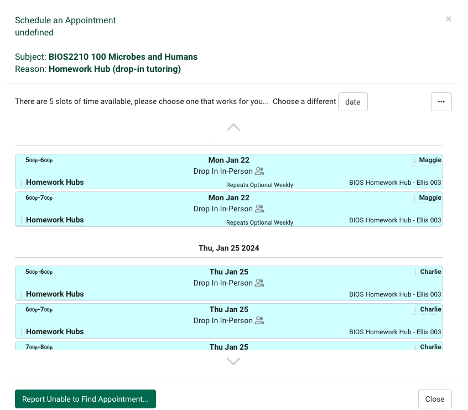
Note: Our tutors work with multiple classes. Please check in at the scheduled location for directions on how to connect with your tutor(s).